If you already bank with Halifax, then you have the option of sending money abroad using its international transfer facility. It’s easy and convenient, but is unlikely to be your cheapest option.
Finder Score for international money transfer services
To make comparing even easier we came up with the Finder Score. Fees, features and customer service across the most popular international money transfer services are all weighted and scaled to produce a score out of 10. The higher the score the better the service – simple.
Please note: You should always refer to quotes you receive from transfer services themselves directly for exact amounts as they may vary from our estimates.
How much does Halifax charge for international transfers?
If you are making a payment in euros, there is no fee attached to your payment. Halifax charges £9.50 on all other international payments, with the exception of payments sent to Ukraine where the bank will refund the £9.50 fee.
The fixed transfer fee is in addition to the mark-up added on the exchange rate.
If you’re arranging the transfer in a branch or over the phone, an optional “Correspondent Bank Fee” can also be paid. Paying this fee means that your recipient shouldn’t incur any costs at their end – Halifax covers it. When you don’t pay this fee, you opt to “share the payment charges with the recipient”. That means your recipient may incur a fee from their bank. When using your online banking or sending euros there’s no option to pay this fee and charges are shared by default.
The Correspondent Bank Fee is £12 for money sent to the US, Canada and European countries outside the EEA, and £20 elsewhere.
What are Halifax’s international transfer exchange rates?
Halifax uses the live “interbank”/”mid-market” exchange rate, but with a cheeky margin added on top. The mark-up varies from 3.55% on transfers below £10,000 to 1.5% on transfers over £250,000. To view Halifax’s current exchange rate for your transfer destination, log in to your internet banking or app and enter the details of your transfer. You’ll be able to review your transaction details, including the exchange rate that will apply, before you commit to sending the transfer.
How long does a Halifax international transfer take?
Halifax transfers in euros (and within the European Economic Area, Monaco, Switzerland and San Marino) should arrive no later than the next working day. Transfers to the US, Canada, South Africa, Australia, New Zealand, the Middle East and the Far East can take up to 4 working days. Any currency to any other country should take no longer than 5 working days.
Are Halifax international transfers safe to use?
Halifax has been around in one form or another for over 150 years. It’s part of Bank of Scotland, which in turn is part of Lloyds Banking Group.
Halifax is regulated by the Financial Conduct Authority (FCA) and the Prudential Regulation Authority with registration number 169628 and is covered by the Financial Ombudsman Service (FOS). Your eligible deposits with Halifax are protected by the Financial Services Compensation Scheme (FSCS) which can offer compensation if a bank goes bust. Halifax’s online services use “Enhanced Internet Authentication” (EIA), encryption and 2-factor authentication.
Note that Halifax should never ask you to move your money to a new sort code and account number.
What is the maximum amount I can send overseas with Halifax?
The maximum you can transfer overseas with Halifax is £100,000 (per transaction) if you’re using your online banking, or £10,000 if you’re using telephone banking.
There’s no upper limit for transfers when you’re in a physical branch.
Additional features
Halifax offers 3 transfer options when you want to send money to an overseas bank account:
One-off transfer. This allows you to send money overseas quickly and conveniently.
Scheduled transfer. This allows you to schedule a transfer for a date in the future.
Regular payments. You can make use of this transfer option when making regular overseas payments to the same person.
How to make an international transfer with Halifax
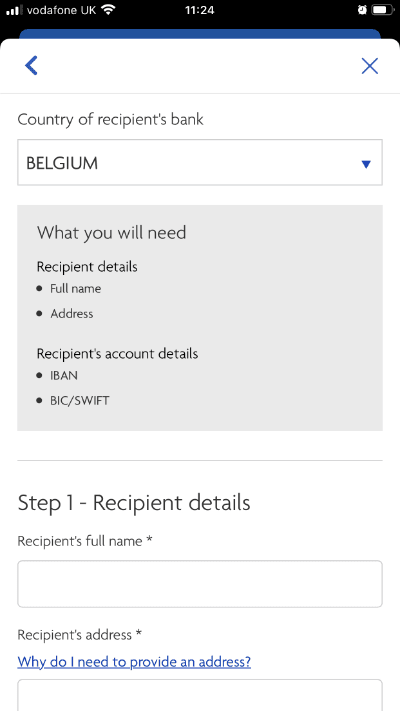
In order to use Halifax’s international money transfer service you’ll need to have a Halifax bank account. If you’re set-up for online banking or use the Halifax app for most of your day-to-day banking needs, you can follow these steps to arrange your international transfer:
Sign in to your online banking or mobile app. Visit the Halifax site and look for the log-in button, or simply launch the mobile app and verify yourself.
Sign in. Select the account you want to pay from and choose “Send money outside the UK”
Select payee. If you’re paying someone new, you’ll be able to set up a new payee. If you’re sending money to someone you’ve paid before, choose “Select an international recipient”. Choose the country from the list and enter the recipient’s details.
Enter sending amount and desired currency. At this point, Halifax should give you an indication of how much your transfer will cost (or how much your recipient is going to receive). You should be able to see what fees are being applied and what exchange rate is being used.
Action the transfer. If you’re happy to proceed, you can go ahead and press send. Halifax may ask you to enter a passcode again at this point or verify your ID with biometrics, since you’re sending to somebody new.
Wait for your transfer to arrive. Halifax international money transfers can take anywhere from a 1–14 business days to land, depending on the destination country.
If you’re heading into a branch, you’ll need your passport or driving licence and a separate proof of address.
Halifax international transfers pros and cons
Pros
Choice of transfer methods. You can place a transfer online through your internet banking account (or in the app), over the phone or by visiting a Halifax branch.
Secure and convenient. Sending an international transfer with Halifax gives you the security and peace of mind of dealing with a trusted global financial institution. Plus, since the service is only for existing customers, users will not have to go through a registration process to access the service.
Transfer immediately, at a later date or set up recurring payments. You can even set up a "SEPA Direct Debit" to pay regular bills in euros to accounts held in the European Economic Area (EEA).
Cons
Transfer fees. Transaction fees apply to all transfers to accounts outside Europe.
Exchange rate margins. Halifax doesn't offer customers the "interbank" exchange rate – it adds a small margin on top (which is a bit cheeky given that it may also charge you fixed fees). The exchange rate will typically be significantly worse than if you were to use a specialist money transfer service.
Transfer speed. Halifax isn't the fastest transfer service around if you're sending outside Europe.
The verdict: Are Halifax international transfers any good?
Halifax international transfers are quite easy and convenient for existing customers, plus Halifax is a well-known and trusted brand. But when compared to dedicated international money transfer services, it’s simply not competitive.
So if you’re sending a small transfer within the EEA, then you might be happy enough to swallow the poor exchange rate for the sake of ease. But because Halifax may charge both a mark-up on the exchange rate and a fixed fee on top, the potential savings you can get from looking elsewhere when transferring more, or further afield, are too good to ignore.
Although Halifax has been upping its app-game, app-first transfer specialists like Wise or WorldRemit have got the user experience down to a fine art, so it’s really not much extra hassle to use them for fast, small transfers. Meanwhile forex specialists like TorFX or Currencies Direct are fantastic at the human touch that can make a financial difference when transferring larger sums.
We show offers we can track - that's not every product on the market...yet. Unless we've said otherwise, products are in no particular order. The terms "best", "top", "cheap" (and variations of these) aren't ratings, though we always explain what's great about a product when we highlight it. This is subject to our terms of use. When you make major financial decisions, consider getting independent financial advice. Always consider your own circumstances when you compare products so you get what's right for you. Most of the data in Finder's comparison tables is provided by Defaqto. In other cases, Finder has sourced data directly from providers.
Chris Lilly is Head of publishing at finder.com. He's a specialist in personal finance, from day-to-day banking to investing to borrowing, and is passionate about helping UK consumers make informed decisions about their money. In his spare time Chris likes forcing his kids to exercise more.
See full bio
Chris's expertise
Chris
has written
515
Finder guides across topics including:
Find the most convenient and cost effective way to transfer your businesses money internationally. Compare money services to get the best exchange rates and low fees.
Get a better exchange rate by transferring money abroad in the same currency. Find out how to beat the banks and save on your international money transfer.
Advertiser disclosure
Finder.com is an independent comparison platform and information service that aims to provide you with the tools you need to make better decisions. While we are independent, the offers that appear on this site are from companies from which Finder receives compensation. We may receive compensation from our partners for placement of their products or services. We may also receive compensation if you click on certain links posted on our site. While compensation arrangements may affect the order, position or placement of product information, it doesn't influence our assessment of those products. Please don't interpret the order in which products appear on our Site as any endorsement or recommendation from us. Finder compares a wide range of products, providers and services but we don't provide information on all available products, providers or services. Please appreciate that there may be other options available to you than the products, providers or services covered by our service.
We update our data regularly, but information can change between updates. Confirm details with the provider you're interested in before making a decision.