Compare bank cards for kids

They have to learn sometime. Compare the best debit cards for your kids, from age 6 up to 18, and keep an eye on how they’re spending.

Need help choosing? How old is your child?
Table: sorted by promoted deals first
6 of 10 results
Finder Score Age range Network Monthly fees Card delivery fee UK cash withdrawal fee Loading fee
Finder score
6-15
Mastercard
£0 (parent needs monzo account)
£0
£0
£0
Bonus rate: Help them save, with 2.75% AER variable interest - it's calculated daily (and paid monthly), so they'll see even small savings add up over time. £10,000 maximum deposit. T&Cs apply.
Ages 6-15. Parents / legal guardians require a personal Monzo account to access Monzo for Under 16s. UK residents only. Ts&Cs apply.
Go to siteView details
Compare product selection
Finder score
6-17
VISA
£0 ((if guardian has a natwest account))
£0
£0
Free
Subscription free for NatWest, Royal Bank of Scotland or Ulster Bank customers. Otherwise £1.99/mo or £19.99/yr. T&Cs apply.
Eligibility – Ages 6-17. Criteria & T&Cs apply. Other fees may apply.
Go to siteView details
Compare product selection
Finder score
6-18
VISA
£3.99 (+2 months free)
£0
£0
1 free/month, then 50p each
Welcome bonus: Get an exclusive 2 months free and £20 pocket money offer when you sign up with CODE: AFFFDR220. T&Cs apply.
Go to siteView details
Compare product selection
nimbl logo
Finder score
Finder score
6-18
Mastercard
£2.67
£0
£0
£0
Welcome bonus: Get 6 months free when you sign up via Finder - that's £1.33 per month for the first child. T&Cs apply.
Go to siteView details
Compare product selection
Osper logo
Finder score
Finder score
8-18
Mastercard
£2.50
£0
£0
Direct debit free. 50p per instant load
Welcome bonus: 22% off the standard pricing + 1 month free trial. T&Cs apply.
Go to siteView details
Compare product selection
Santander logo
Finder score
Finder score
13-17
Mastercard
£0
£0
£0
£0
Bonus rate: Monthly interest of 3% AER/ 2.96% gross (variable) on the entire balance once the balance is £1,500 up to a maximum of £2,000. T&Cs apply.
Online application available for children aged between 13 - 17. If you are opening the account in trust for a child under 13 please visit a Santander branch. You'll need to provide proof of ID and proof of address to open this account.
Go to siteView details
Compare product selection
loading
Showing 6 of 6 results

Finder Score for kids' cards

To make comparing even easier we came up with the Finder Score. Fees, features and controls across the most popular card issuers are all weighted and scaled to produce a score out of 10. The higher the score the better the card – simple.

Read the full methodology
6:29

It’s never too early to teach your kids about money and there are now loads of options designed to help you do just that and give them some control over their finances. You can choose a prepaid kids’ debit card where they can only spend the money you load onto the card, which can be controlled through an app. Alternatively, there are more traditional current accounts designed especially for children.

Prepaid cards for kids

Finder Score Age range Monthly fee Savings goals Set chores

Best overall

Starling logo
Finder score
Starling Kite
Finder Award
Finder score
6-15
£0
View details
Compare product selection

Why we like it

Starling is our top scorer for kids' debit cards. Much like the parent account, it has all the key features you’d expect from a digital bank. There are no overseas fees for spending, so you can rest easy when your child is spending their holiday money. You also stay in control, with real-time notifications and spending limits.

For them, they get their own bank card and app to learn how to manage their money. When they’re a little older (13+), they can also add their card to their mobile wallet. There are no monthly fees or extra charges for top-ups, just easy transfers from your Starling app to theirs.

Pros

  • No fees for topping up the card’s prepaid card.
  • Robust parental controls.
  • Easy for parents to manage from their existing mobile banking app.

Cons

  • Parents already need to be a Starling account holder to order and use Kite.

Best for learning tools

gohenry logo
Finder score
Finder score
6-18
£3.99
Welcome bonus: Get an exclusive 2 months free and £20 pocket money offer when you sign up with CODE: AFFFDR220. T&Cs apply.
Go to site View details
Compare product selection

Why we like it

GoHenry is an obvious choice for the best kids debit card for learning resources. One of the original kids' pocket money apps, it has a range of rich features designed to help your child learn how to manage their money.

But what makes it stand out is its Money Missions. These are bite-sized lessons and gamified quizzes for every age range, with more advanced modules for older children. Your child will earn a digital badge for each skill they master, and you can add your own rewards for completing modules. Topics include banking basics, savings, interest, borrowing and much more.

Pros

  • Full parental control thanks to instant notifications and spending limits
  • One-month free trial
  • It can be used by children as young as six
  • Reward system for completed tasks
  • Children learn about personal finance in a controlled environment
  • Relatives can also send money to the children
  • You can manage up to four child accounts from the same parent account
  • No fees to spend or withdraw cash abroad - these were scrapped in 2020

Cons

  • Monthly fee
  • Only one free top-up to the child account a month
  • Safe, but not as safe and regulated as a bank
  • It doesn’t pay any interest
  • There are cheaper cards available

Best for older kids

Revolut logo
Finder score
Finder score
6-17
£0
View details
Compare product selection

Why we like it

Revolut Kids & Teens is perfect for older kids who want a taste of freedom, but you want to have some sensible parental controls in place. Kids can pay friends, link their card to Apple Pay or Google Pay, and enjoy discounts and rewards with top brands. They can even customise their card with their own doodles.

Meanwhile, you can set yourselves up as co-parents to top up the account, manage activity and set challenges for them to complete.

Pros

  • A parent can digitally top up their child’s account with spending money.
  • Instant parental notifications are generated whenever the child makes a purchase with the prepaid debit card.
  • Parental controls mean rules can be set on where the child’s card can be used.
  • The child gets their own account and payment card, which helps teach them financial skills.
  • The dedicated Revolut children's app lets kids check their account balance and transactions.

Cons

  • The parent has to be a Revolut account holder.
  • If you have more than one child and want more than one Revolut Kids & Teens account, you’ll have to sign up to one of the fee-charging Revolut accounts.
  • There are charges for ATM withdrawals exceeding £40 per month.

Best for regular saving

nimbl logo
Finder score
Finder score
6-18
£2.67
Welcome bonus: Get 6 months free when you sign up via Finder - that's £1.33 per month for the first child. T&Cs apply.
Go to site View details
Compare product selection

Why we like it

Nimbl’s micro-savings feature makes it our top choice for regular saving. This allows children to automatically save between 5p and £5 every time they spend on their card. Like other kids’ cards, your child can also save a set amount each week or make one-off savings, but it’s the micro-savings feature which takes Nimbl’s savings to the next level.

Pros

  • Full control on how children spend their money thanks to spending control settings and instant notifications.
  • Children as young as six years old can use it.
  • It helps you to educate your children to manage their finances.
  • You can turn off online payments or cash withdrawals.
  • Safe and secure. The card can be blocked online or via the app.
  • You can manage more than one Child Account from the same Parent Account.
  • No fees for topping up the Parent Account or child’s card, or for “Gifting”.

Cons

  • While most mainstream bank accounts for children are for free, nimbl charges a monthly fee.
  • You cannot top up the account using cash.
  • With nimbl, children earn no interest on any savings.

Good for parental controls

NatWest Rooster Money logo
Finder score
Finder score
6-17
£0
Subscription free for NatWest, Royal Bank of Scotland or Ulster Bank customers. Otherwise £1.99/mo or £19.99/yr. T&Cs apply.
Eligibility – Ages 6-17. Criteria & T&Cs apply. Other fees may apply.
Go to site View details
Compare product selection

Why we like it

NatWest Rooster Money’s parental controls are flexible and can be adjusted to suit how you want your child to manage their money. You can choose where and how much your kids spend. The Rooster Card also has a dynamic CVV to keep their money safe, where a new CVV is generated for each online purchase.

The app also has a Contactless Counter, which helps you keep track of whether your child is near their contactless limit. If they hit it and have forgotten their PIN, you’re able to reset contactless via your family dashboard, and they can continue to tap away without any issues.

Pros

  • Great educational value; a slick app with lots of features to personalise the way you teach your children about finance.
  • Children as young as 4 years old can use it (6 for the card).
  • Total control over where your children use the card and how much they can spend.
  • Safe and secure. The card can be frozen from the app.
  • No fees for using the card (including abroad).
  • One-month free trial.

Cons

  • If not a NatWest customer, monthly/annual fee to access the full range of features.
  • Caps on the maximum number of parent account loads per day and per month.
  • No interest paid on the account balance.
loading

Kids’ bank accounts with debit cards

Finder Score Interest (AER) Minimum eligibility age Maximum eligibility age Incentive Representative example

Best for interest

Santander logo
Finder score
Finder score
1%
13
17
Go to site More info
Compare product selection

Why we like it

With no minimum age requirement, Santander’s 123 Mini current account lets your child earn interest from the get go. The monthly interest on the account is tiered, but the maximum they can earn is 3% AER on balances over £1,500, up to £2,000.

For children under 13, the account is opened in trust by an adult. When your child reaches 11, you can choose to hand over the account to the child or continue to manage the account until they turn 18. If your child is 13 or older, they can get a contactless debit card or a cash card and manage the account themselves.

Pros

  • Can be opened from the age of zero
  • No monthly fee
  • Interest paid on balances
  • Choice of debit card and cash card

Cons

  • Interest only paid on set amount
  • No standard savings account for children

Great for no fees

Monzo logo
Finder score
Finder score
0%
6
15
Help them save, with 3.00% AER variable interest - it's calculated daily (and paid monthly), so they'll see even small savings add up over time. £10,000 maximum deposit. Ts&Cs apply.
Ages 6-15. Parents / legal guardians require a personal Monzo account to access Monzo for Under 16s. UK residents only. Ts&Cs apply.
Go to site More info
Compare product selection

Why we like it

Monzo for Under 16s has no monthly fees, no transaction fees, no cash withdrawal fees, no fees for paying abroad….you see where we’re going here. It’s also a feature-rich bank account with interest-earning savings pots, easy transfers between the parent and child accounts, and all the parental controls you would want.

Kids get their own app, where they can set up savings pots and manage their own money, as well as boost their learning with Monzo’s educational cards.

Pros

  • Free for every child
  • Earn interest with Savings
  • Their own neon card
  • Account for kids with controls set by parents

Cons

  • Parent needs a Monzo account
  • Lack of educational features

Good for parental oversight

Lloyds Bank logo
Finder score
Finder score
0%
11
15
More info
Compare product selection

Why we like it

We like that Lloyds’s Smart Start account is a spending and savings account in one. Also that this high street account gives parents complete oversight. So you can keep an eye on your child’s account through your own mobile banking app, and you can rest easy as spending isn’t allowed in over-18 outlets like off-licenses.

Just bear in mind that you’ll need a Club Lloyds Current Account in order for your child to have a Smart Start account. As Lloyds is also part of the Lloyds Banking Group, you’ll find that Halifax Smart Start and Bank of Scotland Smart Start accounts have the same features.

Pros

  • No monthly fees
  • Spending controls
  • FSCS protected
  • Children can manage the account online or using the mobile app

Cons

  • Parent or guardian will need a Club Lloyds Current Account
  • No current account or prepaid card for children under 11

Best for overseas spending

Nationwide BS logo
Finder score
Finder score
2%
11
17
More info
Compare product selection

Why we like it

Nationwide FlexOne is our top pick for a kids account with no fees for making a payment or withdrawing cash from an ATM while overseas. As your child grows they’ll want to explore more of the world. Be it on a school trip or a post-GCSE holiday, you’ll want to make sure that they can spend their money abroad without any issues.

This account also offers interest on balances and your child can keep it until they’re 23, when they’ll be moved across to a FlexAccount or FlexDirect account.

Pros

  • Account is free to open and manage
  • Fee-free transactions abroad
  • Interest paid on credit balances
  • Choice of cash card or Visa debit card
  • FSCS protection

Cons

  • Interest only paid on balances up to £1,000
  • Must be at least 11 to apply
  • Accounts for 11 and 12 year olds can only be opened over the phone or at certain branches with a tablet
  • No specific app for children

Best for teens

Starling logo
Finder score
Finder score
0%
16
17
More info
Compare product selection

Why we like it

Starling’s Teen account is specifically designed for 16 and 17 year olds. It does nearly everything Starling’s main current account does, but doesn’t have an overdraft option. It can be set up in minutes through the app and has all the money management tools Starling is known for, including instant notifications, spending insights and dedicated Savings Spaces.

Alongside this, your teen can settle payments with friends by sending a payment link directly from their phone, or by using Starling’s “Settle up with Nearby Payments” feature.

Pros

  • Account is free to open and operate
  • App is packed with features to help young people better manage their money
  • 24/7 customer support

Cons

  • Account can only be operated via the app
  • Your teen will need to have a mobile phone
  • Only available to 16- and 17-year-olds
loading

Features of a kids’ prepaid debit card

  • Spending controls. Many children’s debit cards come with spending control limits that parents can set within the linked mobile app.
  • Card lock. Parents can also lock the debit card via the app so it can’t be used.
  • Choose how your child can spend. Parents can choose if the debit card can be used at ATMs, online or for in-store purchases.
  • Spending tracking tools. Many of the apps offer spending tracking tools and features to help your child learn how to manage their money.

How to choose the best prepaid debit cards for kids

Compare the following features when shopping around for a debit card for your kids:

  • Check the fees. The costs can vary between different cards. Most prepaid accounts will have either a monthly or yearly fee.
  • Spending limits. Look for cards that let you cap daily spending, set limits for ATM withdrawals or block specific stores.
  • Shopping online. Consider whether being able to buy online is a benefit or a downside, and opt for a kids’ debit card that can restrict or block online spending if needed.
Cathy Hudson's headshot
Our expert says: More options for children to manage their money than ever

"There’s been a whole new breed of children’s account launched in recent years – prepaid cards for kids let you load their pocket money onto the card and set spending controls. Kids can also learn to budget and set goals through innovative apps that effectively gamify money management.

Some cards have monthly fees. These include NatWest’s Rooster Money, GoHenry, Starling Kite and Nimbl. GoHenry is famous for its tools to help children learn about money, with quizzes, rewards, badges and the ability for them to earn money by doing chores. The personalised cards are also fun for children to have.

Starling and Revolut, which are well known as digital-only banking apps for adults, require you to have your own account with them if you’re setting an account up for your child. While Revolut’s under-18 account has no monthly fee, you’ll get an extra level of control over your child’s account if you have one of Revolut’s paid-for accounts yourself.

HyperJar Kids is another option with no monthly fee. Its digital jars let children save money for specific things and set goals, and they can choose names and colours for each. It means they can learn to save and budget without even realising it."

Cathy Hudson's headshot
Money expert

How do prepaid debit cards for kids work?

Many debit cards for kids are prepaid cards. You can load money onto them from the parent’s bank account using a mobile app that accompanies the physical card.

A lot of these cards and apps come with extra features, like the ability to see how your child spends their money or the option to pay them pocket money for doing their chores.

At what age can my child get a prepaid debit card?

Prepaid cards can be available for kids as young as 6. You can let your child keep their prepaid card as they get older, or help them open a current account for teenagers when they’ve outgrown the prepaid card.

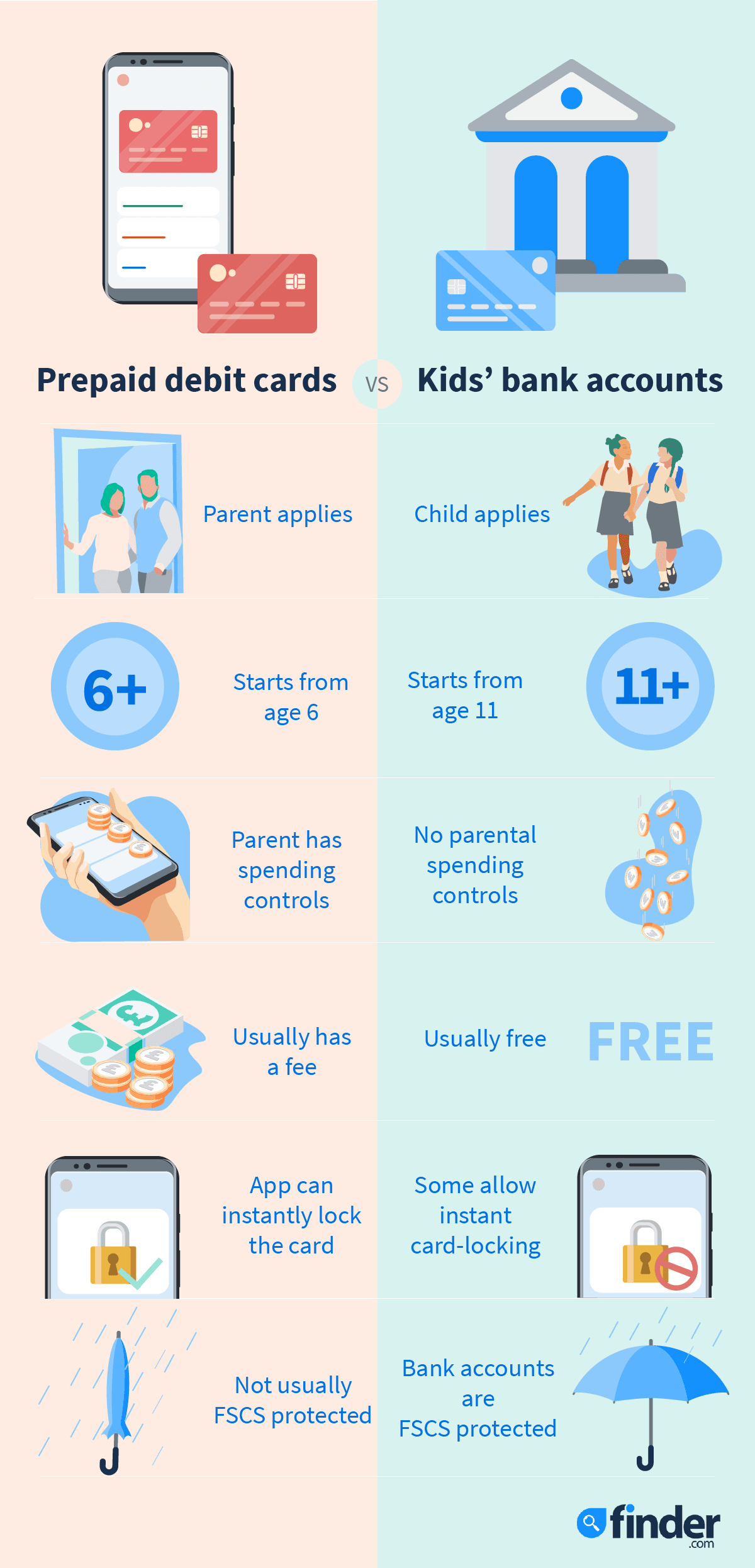
What’s the difference between a kids’ prepaid debit card and a children’s bank account?

Debit cards are available with both the app-based digital accounts mentioned in this guide, as well as with traditional children’s bank accounts. So the difference is actually between the accounts themselves. Children’s bank accounts are current accounts, operated by traditional banks in a similar way to adult current accounts, although they don’t have overdrafts and sometimes have spending limits. There’s usually not a fee involved for having the account, and kids can use the accompanying debit card to make purchases and ATM withdrawals. Obviously children will need money in their bank account in order to do this, and you can add funds as a parent, have family members pay monetary gifts in, or they can even have some wages from a part-time job paid in if they’re old enough to be working.

With the app-based accounts, usually run by digital-only providers, the kids’ debit cards are prepaid, so you’ll have to load money onto them. Often it’s only the account owner, which is the parent, who can do this. There’s sometimes a subscription fee associated with these accounts, but in return you get more digital features and innovative ways to manage the account through the app (including parental controls and digital notifications), than you would with a traditional children’s bank account. This type of digital account plus card is also available for kids who might be too young to open a traditional bank account.

Kid debit cards

Can I get a credit card for my child?

You have to be 18 to get a credit card in the UK, so it won’t be possible for your child to have one. However, parents can get a prepaid card (like the ones outlined in this guide) for children as young as 6. Another option is to set up a children’s bank account, as these often come with a debit card or a cash card that kids can use from around the age of 11.

What are the pros and cons of prepaid debit cards for kids?

Before you get a debit card for your child, consider these features and drawbacks:

Pros

  • Control. Keep track of your child's spending online and cap the daily limit as you see fit.
  • Security. You can monitor your child's spending in the mobile app and see where they're shopping.
  • Safety. Because you can quickly and easily lock the debit card if it's misplaced, debit cards are often safer than carrying cash.
  • Good practice. Using a debit card will teach your child how money works digitally, as well as create good budgeting habits.

Cons

  • Not a current account. These types of debit cards are prepaid cards and not actual current accounts.
  • Not good for large purchases. The spending limits on these prepaid debit cards for kids are generally much lower than those found on traditional adult debit cards.
  • Account fees. Many of these cards and their associated apps come with a monthly or annual fee.
  • No interest. These types of prepaid accounts usually don't pay interest.
  • Age limits. Each debit card or app can set its own age limit.

Kids’ prepaid cards customer satisfaction league table 2025

BrandLogoCustomers who’d recommendReviewLink
Starling KiteStarling Kite logo93%Starling Kite is Starling’s easy-to-use kids’ prepaid card option for parents with a Starling account. It has low fees and strong parental controls.Read our review
OsperOsper logo90%Osper is a prepaid debit card for children that parents can review and control from an app on their phone.Read our review
GoHenryGoHenry logo88%Popular kids’ card and app combo GoHenry offers customised spending cards and parental controls, as well as interactive Money Missions.Read our review
NatWest Rooster MoneyNatWest Rooster Money logo88%NatWest Rooster Money is a dedicated kids’ card and app which has a big focus on financial education.Read our review
Revolut Kids & TeensRevolut<18 (Revolut Junior) logo87%Revolut Kids & Teens is Revolut’s kids’ prepaid card offering, which is easy to use. Parents will already need to have an account with Revolut to get it. Read our review
NimblNimbl logo70%Nimbl is a kids’ pocket money card and app, which also aims to help children learn money skills.Read our review
    • Which factors are most important in a kids’ prepaid card?

      As part of our customer satisfaction survey, we received feedback from customers on the elements they value most in a card for children. Below, you can see the results of this analysis, highlighting the most important factors when you’re looking for the best kids’ prepaid card or debit card.

      RankingKids’ card factor% of customers it’s a priority for
      1Ease of use and accessibility42.5%
      2Fees and charges8.8%
      3Teaching tools and learning features7.8%
      4Customer service and support7.5%
      5App quality and digital technology7.5%
      6Trust and transparency4.4%
      7Security and safety3.1%
      8Parental controls and spending limits2.5%
      9Speed and efficiency1.6%
      10Money management and child autonomy1.6%

      Bottom line

      Prepaid kids’ debit cards with apps to control them are a great way for kids to learn how to manage their money and make it fun and accessible. GoHenry is probably the best known but there are a range of alternatives you can consider. Read our guide to GoHenry and similar alternatives to find out more.

      If you would prefer your child to have an account with a fuller range of banking features or one just for savings visit our guides to current accounts for children and savings accounts for children.

      Finder whitepaper cover

      Financial education: Are parents equipped to fill the gap?

      Finder published a paper in August 2023 exploring financial education in the UK and how parents are stepping in to teach their children about money. The report includes the findings of our survey of 1,007 of UK adults with children either at primary or secondary school, and insights from teachers, an academic and experts at GoHenry, HyperJar and All Things Money.
      Download your free copy

      All the content may be republished with a link to this page
      Press enquiries
      Frequently asked questions

      We show offers we can track - that's not every product on the market...yet. Unless we've said otherwise, products are in no particular order. The terms "best", "top", "cheap" (and variations of these) aren't ratings, though we always explain what's great about a product when we highlight it. This is subject to our terms of use. When you make major financial decisions, consider getting independent financial advice. Always consider your own circumstances when you compare products so you get what's right for you. Most of the data in Finder's comparison tables is provided by Defaqto. In other cases, Finder has sourced data directly from providers.

      Sources

      Jason Loewenthal's headshot
      Rachel Wait's headshot
      To make sure you get accurate and helpful information, this guide has been edited by Jason Loewenthal and reviewed by Rachel Wait, a member of Finder's Editorial Review Board.
      Matthew Boyle's headshot
      Written by

      Publisher

      Matthew Boyle is a banking and mortgages publisher at Finder. He has a 7-year history of publishing helpful guides to assist consumers in making better decisions. In his spare time, you will find him walking in the Norfolk countryside admiring the local wildlife. See full bio

      Matthew's expertise
      Matthew has written 222 Finder guides across topics including:
      • Helping first-time buyers apply for a mortgage
      • Comparing bank accounts and highlighting useful features
      • Publishing easy-to-understand guides

      Read more on Children's Banking

      Go to site