Starling international payments

An easy-to-use international payments service that sits within the digital bank’s app.

No reviews yet. Write a review

Starling

Starling is known for its digital-first approach to banking and fee-free foreign card payments. While its in-app international payments service is slick and easy-to-use, its transfer costs can run quite high.

How much does Starling charge for international payments?

Starling’s international transfer fees are on the high side. What you need to be aware of is there are two fees to making an international payment with the bank:

  • A Starling transfer fee of 0.4%
  • A delivery fee

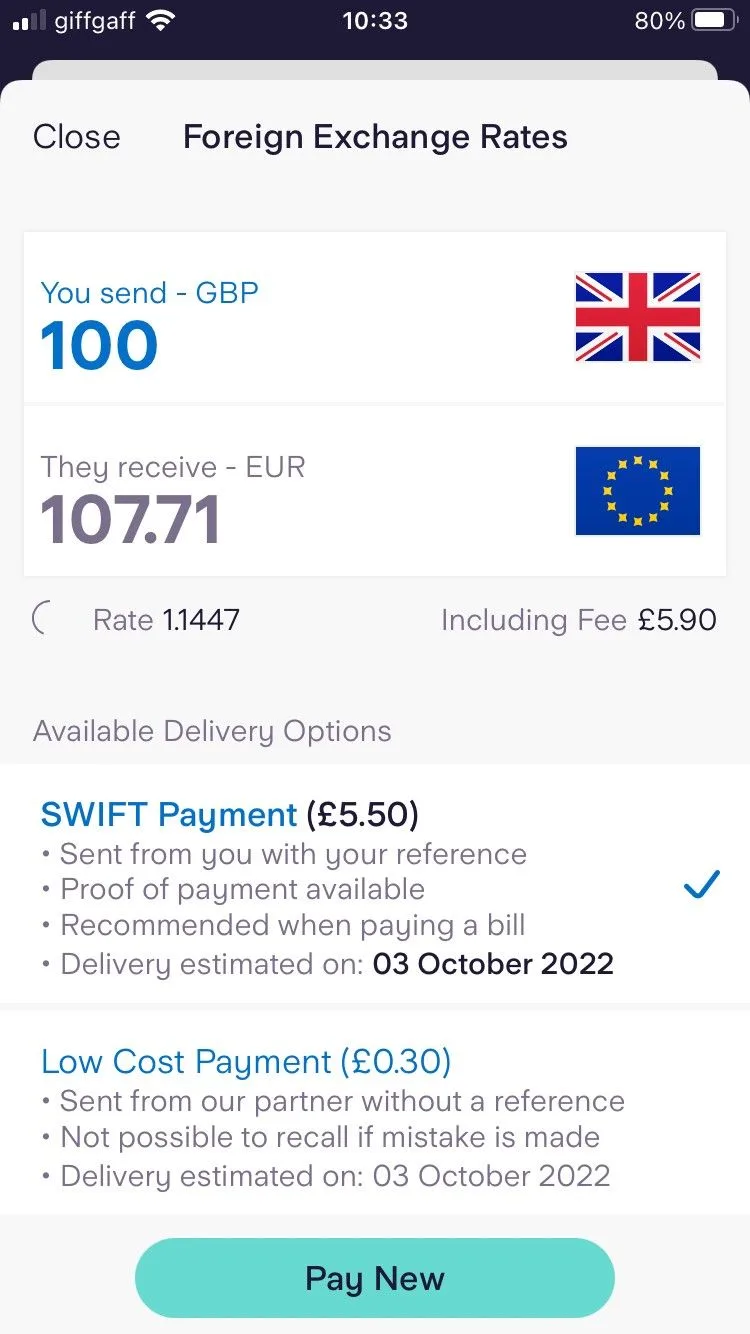
How much the delivery fee is, depends on which option you choose. If you select a priority delivery via SWIFT, then you will be charged £5.50. However, there is a low-cost local network option, where fees start from £0.30 depending on the currency.

Starling will always show you the exchange rate, the fee and what your recipient will receive. So it’s possible to compare the cost against other money transfer providers before you hit send.

What are Starling’s international transfer exchange rates?

To make up for its transfer fees, Starling’s international transfer exchange rates are pretty competitive. Most money transfer providers will add a margin to the mid-market rate, which is the rate banks trade between themselves. However, Starling’s exchange rates are pretty close to the mid-market rate for all the major currencies.

Starling international transfers pros and cons

Pros

  • Easy to use app. Starling is already known for its user experience and you can expect the same when it comes to making international payments with the digital banking app.
  • Transparent pricing. You will know how much your recipient will receive before hitting send.

Cons

  • Transfer fees. Fees can be on the high side, especially if you prioritise speed over cost and use its SWIFT delivery option.
  • Limited currencies. Compared to some of the specialist money transfer providers, Starling’s range seems particularly limited at 34 countries in 17 currencies.
  • Weekday only. Starling only processes payments from 02:00 Monday to 22:00 Friday.
  • No forex tools. If you're sending a large sum, you may wish to explore more advanced forex features like rate triggers (where your exchange executes if the exchange rate reaches a figure of your choosing). For these, you'll want to work with a specialist broker like TorFX

How do I make an international transfer with Starling?

Starling Bank app screenshot

  1. Open your app and navigate to “Payments”.
  2. Select “Send Money”.
  3. Choose “Foreign Exchange Rates”. At this point you can choose the currency and enter how much you want to send in GBP.
  4. You will be able to see the exchange rate and any transfers fees. If you are happy to proceed, choose “Continue”.
  5. You’ll now be prompted to set up a new payee or select an existing payee.
  6. Finally confirm your transfer.

Are Starling international transfers safe to use?

Starling is a registered bank in the UK (reference No. 09092149) and is therefore covered by the Financial Services Compensation Scheme (FSCS). It is also regulated by the Financial Conduct Authority (FCA) and authorised by the Prudential Regulation Authority. This means that in most cases, it will refund any unauthorised payments made from your account and refund you if you’re tricked into sending money to a scammer voluntarily. The exception is if you are gross negligence.

As you can see, Starling is all above board. It was founded in 2014 and is headquartered in London.

The verdict: Are Starling international transfers any good?

If you are looking for easy, then Starling has you covered. Its international payments sit nicely in its app, where you can have the same user experience as all its other services. However, if you’re looking for a cheaper, more wide ranging service (or one that’s open at weekends), then you’re better off looking at a more specialised money transfer provider. Starling’s international transfer lets itself down in potential delivery costs and the fact that payments will only be processed Monday to Friday.

Frequently asked questions

Our “Best for” picks highlight top options in specific categories based on our independent evaluation (see our full methodology), while “Promoted” tags indicate sponsored placements. Selected products may not suit everyone. We track selected market offers, which may not cover every product. Products are listed in no particular order unless specified, and inclusion or ordering may be influenced by popularity or commercial agreements. Most comparison table data is provided by Defaqto or sourced directly from providers. Always evaluate your own circumstances and consider independent advice before making major financial decisions.
Kate Steere's headshot

Kate Steere is an editor and money expert at Finder, specialising in banking, savings and fintech. She has previously written for The Motley Fool UK and Fitch Solutions, where she covered a wide range of personal finance topics and kept a close eye on market trends. Kate has a Bachelor of Arts in Modern History from the University of East Anglia. When not working, she can usually be found curled up with a good book or heading out for a run. See full bio

Kate's expertise
Kate has written 153 Finder guides across topics including:
  • Banking
  • Savings
  • Fintech
  • Credit
  • Payments

More guides on Finder

Go to site