Robinhood offers a simple way to trade futures contracts. Its fees are competitive, and its intuitive interface streamlines trading, making Robinhood accessible for both beginner and intermediate traders.
We’ll walk you through the four key steps to start trading futures on Robinhood: opening and funding your account, enabling futures trading, placing trades and closing positions. We’ll also cover Robinhood futures trading fees and the platform’s advantages and disadvantages, so you can trade smarter and with confidence.
Step 1. Open and fund your Robinhood account
Getting started with Robinhood is straightforward:
Go to Robinhood’s website or app and select Sign up or select the Go to site button below.
Enter your email, password, full name, phone number, date of birth, address, citizenship status and Social Security number.
Answer questions about your investing experience and provide employment details.
Review Robinhood’s agreements and link a bank account or debit card to fund your account.
9.4
Excellent
Trade Smarter with Robinhood Gold
The costs, tools and platform you need to trade options effectively
Trade $0.50 futures contracts with Robinhood Gold
Access low margin rates, starting at 5%
Get higher instant deposits with Robinhood Gold
Earn 3.25% interest on your uninvested cash with Robinhood Gold
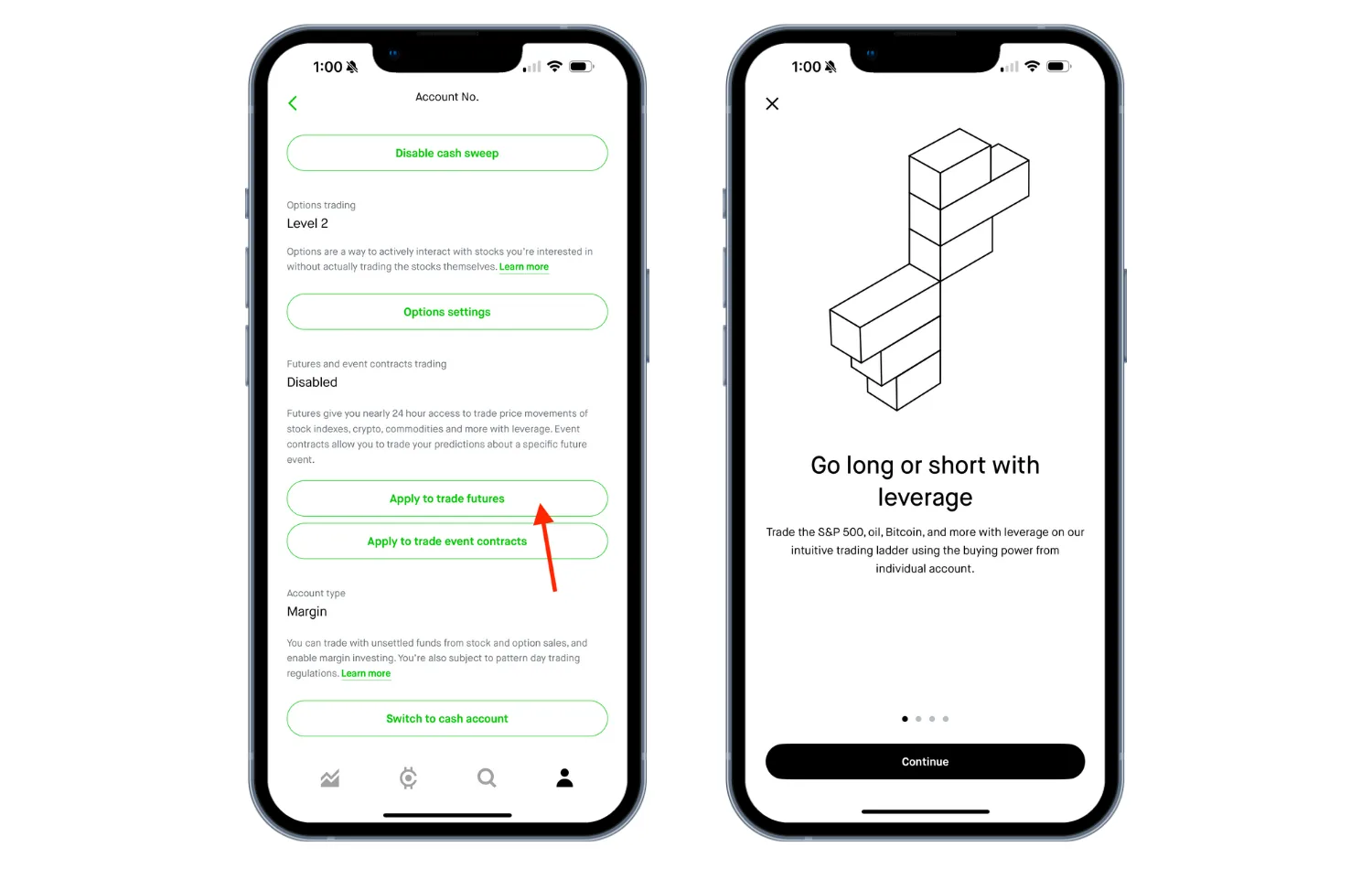
Step 2. Enable futures trading in your account
Before you can trade, you need approval from Robinhood:
Log in to your account via desktop or app.
Open your account menu and tap the silhouette icon at the bottom.
Select Investing, scroll to Futures trading and select Enable futures trading.
Complete the qualifying questions about your investment experience.
Review your investor profile and accept the futures agreement.
Tip. Take your time completing the application accurately. Approval is required before you can place trades.
Tip. Familiarize yourself with Robinhood’s order types, margin requirements and settlement rules before trading.
Step 4. Closing futures trades
Before a futures contract expires, you have three ways to handle your positions: close the position, roll it into a new contract or hold it to settlement.
Close early
If you want to exit your trade before the contract expires, the easiest way is to place an offsetting order. That just means taking the opposite action of your current position:
If you bought the contract, sell it to close.
If you sold the contract, buy it to close.
The difference between your opening and closing prices determines your profit or loss.
Roll the position
If your contract is about to expire but you want to keep the same position, you can roll it into a new contract. This involves:
Closing your existing contract.
Opening a new contract with the same underlying product, direction (long or short) and quantity — but with a later expiration date.
Note. Robinhood doesn’t let you roll a contract in a single order, so you’ll need to do this manually.
3. Settlement
If you don’t want to close or roll your position, you can just let it go to settlement at expiration.
Cash-settled contracts. Hold until expiration. Your profit or loss is calculated based on the final settlement price, and the net amount is credited to your account.
Physically settled contracts. Robinhood doesn’t support physical delivery, so close the position before the last day to trade (LDTT). Otherwise, Robinhood may close it automatically.
Robinhood’s futures fees
Robinhood offers competitive fees, with even lower rates for Robinhood Gold.
Fee type
Fee details
Commissions
Non-Gold customers: $0.75
Gold customer: $50
Margin rate
3.95%–5%; Robinhood Gold customers get the first $1,000 of margin interest-free
NFA regulatory fee
$0.02
Exchange fee for trades
$0.20–$7.50
Exchange fee for cash settlements
$0.00–$2.50
Available futures markets on Robinhood
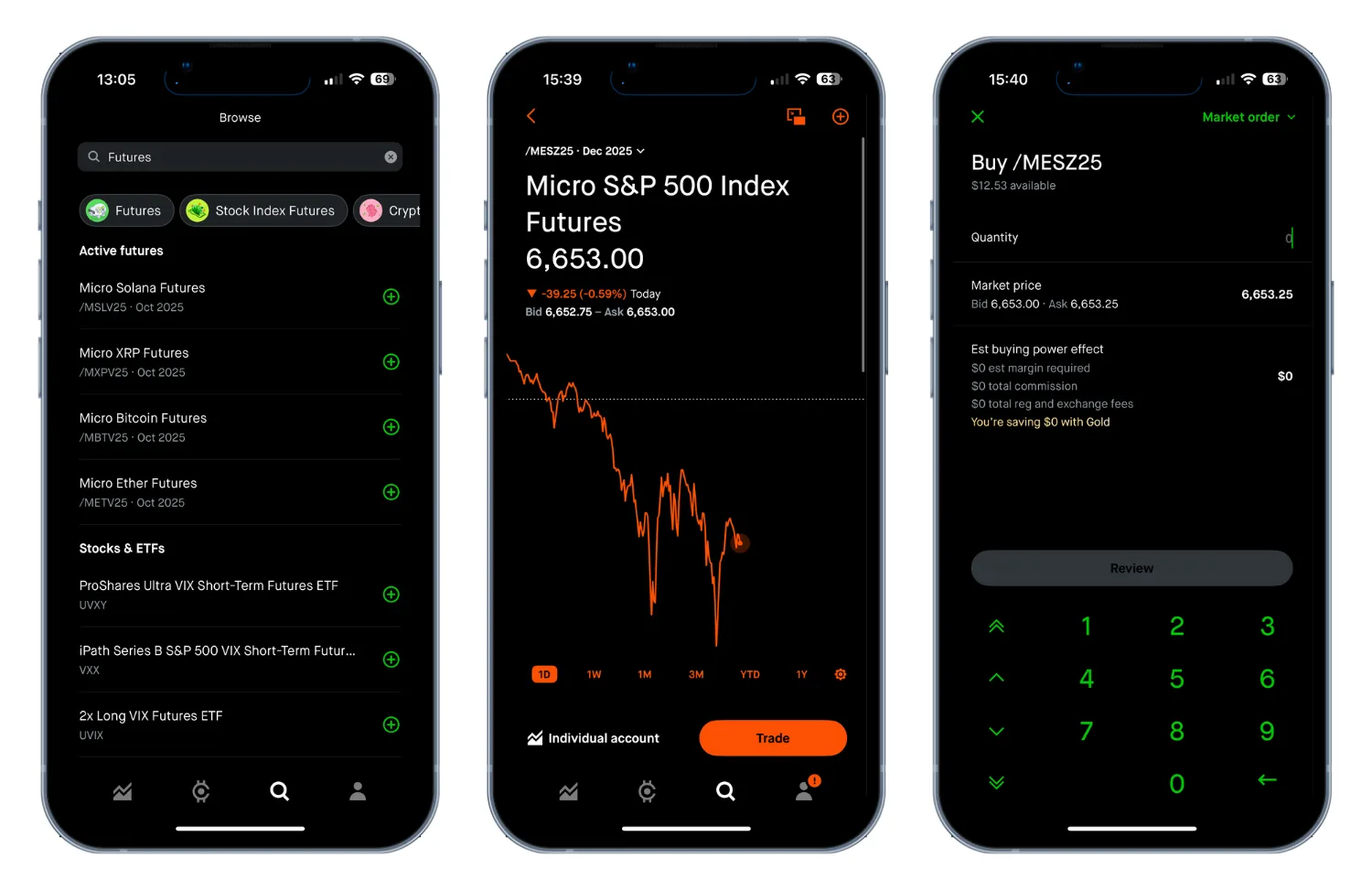
Robinhood offers futures trading in several popular markets, giving you access to key opportunities without overwhelming complexity. While it doesn’t cover every niche or international contract, here’s an overview of what’s available.
Low trading costs. $0.75 per contract (non-Gold) or $0.50 per contract (Gold).
Simple user interface. Robinhood’s streamlined and easy-to-use interface simplifies the trading and investing experience.
Advanced charting with Robinhood Legend. Access customizable layouts, real-time data and over 80 technical indicators to analyze market trends effectively.
Cons
Limited overall selection of futures contracts. While popular markets are available, some niche, international or less common futures are not supported.
No support for complex hedging strategies. Multi-leg futures strategies or advanced spreads aren’t fully supported.
No intraday margin. Robinhood requires full margin for all futures trades. Unlike some other brokers, it doesn’t offer reduced day-trade margins, which may limit flexibility for active traders.
Compare Robinhood to other futures trading platforms
36a542f4-b0c7-464a-9267-f4e555e56c31-3% IRA match with Robinhood Gold ($5/month)
3% IRA match with Robinhood Gold ($5/month)
$0.50 commission per futures contract with Gold
Trade index, energy, currency, metals and crypto futures
Customizable chart with advanced trading tools
Frequently asked questions
You may be ineligible if your futures trading application is incomplete or missing required information. Robinhood may also deny approval if you don't meet eligibility criteria. Account restrictions, such as being flagged as a Pattern Day Trader (PDT), can also prevent access. Make sure your application is complete and check your account for any restrictions.
No. The $25,000 requirement only applies to Pattern Day Trader rules for stocks and options, not futures. However, you do need enough funds to meet margin requirements for the contracts you trade.
Matt Miczulski is an investments editor and market analyst at Finder. With over 450 bylines, Matt dissects and reviews brokers and investing platforms to expose perks and pain points, explores investment products and concepts and covers market news, making investing more accessible and helping readers to make informed financial decisions.
Before joining Finder in 2021, Matt covered everything from finance news and banking to debt and travel for FinanceBuzz. His expertise and analysis on investing and other financial topics has been featured on Yahoo Finance, CBS, MSN, Best Company and Consolidated Credit, among others. Matt holds a BA in history from William Paterson University.
See full bio
Matt's expertise
Matt
has written
291
Finder guides across topics including:
Moomoo pays up to $600 to switch, but Fidelity charges nothing to leave. See how these two very different brokers compare on fees, IRAs, crypto access and safety in 2026.
Discover the best robo-advisors of 2026. Compare fees, account minimums and features from top platforms that automate investing for beginners and pros.
We’ve rounded up stats on some of the most popular oil stocks, along with information on how they compare and how to invest.
Advertiser disclosure
Finder.com is an independent comparison platform and information service that aims to provide you with the tools you need to make better decisions. While we are independent, the offers that appear on this site are from companies from which Finder receives compensation. We may receive compensation from our partners for placement of their products or services. We may also receive compensation if you click on certain links posted on our site. While compensation arrangements may affect the order, position or placement of product information, it doesn't influence our assessment of those products. Please don't interpret the order in which products appear on our Site as any endorsement or recommendation from us. Finder compares a wide range of products, providers and services but we don't provide information on all available products, providers or services. Please appreciate that there may be other options available to you than the products, providers or services covered by our service.
We update our data regularly, but information can change between updates. Confirm details with the provider you're interested in before making a decision.