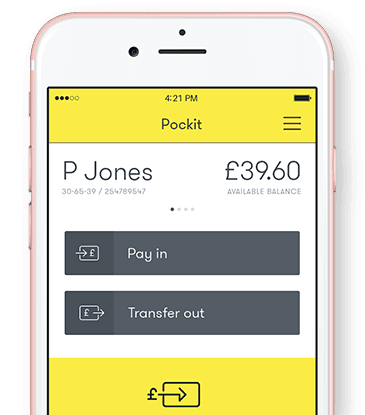
Pockit is an up-and-coming digital banking brand looking to change the way we handle our finances. Moving away from traditional banking systems, Pockit works to deliver all the services given to you by a traditional bank account entirely from your smartphone.
What is Pockit?
Pockit believes “that accounts should be available to all, regardless of income or credit status.” Seeing high-street bank accounts as unreachable for many of the most vulnerable, Pockit provides accessible and affordable prepaid card accounts to anyone regardless of credit history or income. Pockit uses smartphone technology and the best of traditional bank accounts to deliver a service which it hopes will work for everyone.
How does Pockit work?
Apart from the online registration process and the physical card you are sent in the post, Pockit provides all its services directly from your smartphone. The app is simple and functional, streamlining the necessary processes rather than relying on gimmicks, bells and whistles.
The home screen displays your balance, account number and sort code, as well as your most recent transactions. In the app you will be able to:
Transfer money: Select whether you want to send money to someone or pay money into your account.
View your PIN: Answer your security question and view your pin number one digit at a time.
See your statements: A live e-statement which records all payments in and out of your account.
Freeze your cards: Block and unblock your cards, especially helpful if you misplace them. You can also replace them if needed.
Edit your profile: Amend personal details as necessary.
Get support: A collection of FAQs for if you ever get stuck.
You will also be able to earn cashback with Pockit paid-for plans. If you pay with your Pockit card online or instore, you can earn up to 15% cashback at selected retailers. With the Pockit Extra plan, you’ll also earn 1% cashback on your everyday purchases and direct debits (up to £250 spend), while the Pockit Premium plan offers 2.5% cashback on eligible spending (up to £100 spend per month).
Pockit bank transfers
There are 4 ways you can put money into your account.
Get your wages or benefits paid straight in by your employer or benefits provider– simply give them your account details. You can even get your wages or benefits paid a day early for free.
By bank transfer. Just share your account number and sort code with whoever is transferring the money.
By using a debit card. Simply enter your card details and how much money you want to load into your account.
Pay in with cash at one of over 28,000 PayPoint locations across the UK.
If you’re depositing cash, your funds will transfer into your Pockit account instantly. It can take up to a few hours for this to show on your balance and statement.Bank transfers are usually quick, but can take up to 2 hours.
In terms of transferring money to someone, it should take around 2 hours for your money to reach the person you’re paying. This is as long as you transfer during normal working hours.
Can Pockit be used abroad?
Travelling with Pockit’s prepaid card is possible, but it wasn’t intended for use abroad. Pockit’s cards are accepted around the world, wherever you see the Mastercard sign. However, unlike some other prepaid cards on the market, Pockit’s come with a hefty charge of 4% when used overseas. If you are looking for a card to travel with it might be better to look elsewhere.
Pockit fees and limits
Pockit offers 4 different plans. The Everyday plan costs £2.49 a month, the Extra plan costs £6.99 a month, and the Premium plan (designed to help you build credit) is £9.99 a month. There’s also a pay as you go plan with no monthly fee, but you won’t get cashback and other charges apply. This makes it best for occasional use.
Depending on the account you choose, different fees will apply for certain transactions.
The fees below are for an Everyday plan as a full account holder (you’ll be a full account holder once you’ve verified your ID):
Actions
Fees and Limits
Your contactless Pockit Mastercard
99p to £19.99, depending on your chosen delivery method
Paying in with cash
1.99
UK national transfers
£1.29
UK ATM withdrawals
1.99
Monthly membership fee
£2.49
International ATM fee
£2.25
Foreign Exchange fee
4%
Direct debits
99p
Top ups via bank transfer
£10,000 per month
Cash deposits
£249 at a time
Adding money via debit card
£3,000 a month
Withdrawals
£250 a time and £5,000 a month
Pockit’s fees are reasonable given its accessibility, but you may be able to find an account with another challenger bank that relies less on fees.
Is Pockit safe?
Security is very important to Pockit, and as such a number of measures are in place to keep your money safe. Registration requires little personal information, making it more difficult to have your identity compromised.
Your account is kept behind a password and a security question must be answered to access your pin and some of the app’s money-handling functions.
However, as Pockit is not a bank your money won’t be protected by the Financial Services Compensation Scheme (FSCS). Instead, the Pockit card is issued by PSI-Pay Ltd which is an electronic money institution authorised by the Financial Conduct Authority (FCA). This means your money must be held in segregated accounts to keep it safe.
Pros and cons of Pockit
Pros
Registration takes minutes, can be done on your work break.
Contactless Mastercard.
Accessible to anyone regardless of income or credit status.
Streamlined app.
Safe and secure.
Option to build credit.
Earn cashback on your spending.
Choice of plans.
Cons
Small charges on many basic card functions.
Not registered with the Financial Services Compensation Scheme.
Not officially a bank, so you will still need traditional banks for all other financial needs.
High fees for using the card abroad.
Lack of face-to-face communication may put some people off using Pockit’s services.
Customer service information for Pockit
Email support
Telephone support
In-app or live chat
Contact form
Branch support
Our verdict
Pockit can be an alternative to a traditional current account if you want something more techy or are having a hard time qualifying for one because of a not-so-perfect credit score. It also wins points for offering a credit builder feature on one of its plans.
However, Pockit’s fees aren’t especially competitive. Even if you’re having trouble getting a traditional account, you could still qualify for a basic current account (which has all the features of a current account except for overdrafts) or for a current account with a digital bank like Monzo or Starling (they only check your credit score when you apply for an overdraft). All of these charge no monthly fees and offer free ATM withdrawals, transfers and payments in the UK.
All in all, you could still consider Pockit for its slick app and ease of use (and we love the bright yellow branding!), just keep in mind that it isn’t the cheapest kid in town.
Frequently asked questions
Pockit makes money through the fees it charges for its account and cards. It also works with Youtility to offer broadband and mobile phone deals, which means it earns a commission every time someone switches suppliers.
A shared balance means the balance on the main account will be shared by all cardholders and can be spent by anyone with a card linked to this. Please note that only the primary card holders can pay into the account.
A separate balance means you can choose how much you transfer to an additional cardholder, and they can only spend up to the balance you transfer.
Very easy, simply transfer money from your current account, use your debit card, head to a PayPoint to make a deposit or request your wages be paid to your Pockit account.
You should receive your Pockit Mastercard within 2 working days, but it can take up to 5. If you haven’t received yours after this time, please contact Pockit support directly to get an update.
It should take around 2 hours for your money to reach the person you’re paying. This is as long as you transfer during normal working hours.
When depositing cash through a PayPoint or bank transfer, your funds usually transfer to your Pockit account instantly (though bank transfers can take up to 2 hours). It can take 30 minutes for this to show on your balance and statement.
Pockit is a prepaid Mastercard, and so does not use a bank.
Yes, you can. As it’s a prepaid Mastercard, it can be used at over 2 million ATMs and 30 million locations. However, the card is available only in GBP, so you should expect any usage abroad to incur additional charges.
We show offers we can track - that's not every product on the market...yet. Unless we've said otherwise, products are in no particular order. The terms "best", "top", "cheap" (and variations of these) aren't ratings, though we always explain what's great about a product when we highlight it. This is subject to our terms of use. When you make major financial decisions, consider getting independent financial advice. Always consider your own circumstances when you compare products so you get what's right for you. Most of the data in Finder's comparison tables is provided by Defaqto. In other cases, Finder has sourced data directly from providers.
Michelle Stevens is a deputy editor at Finder, specialising in banking, credit, loans and mortgages. She has a journalism degree from the University of Sheffield and has been a journalist for 15 years, writing on topics including fintech, payment systems and retail. In her spare time, Michelle likes to travel, explore new foodie experiences and attempt to improve her own culinary skills.
See full bio
Michelle's expertise
Michelle
has written
81
Finder guides across topics including:
Planning a trip abroad? Make sure you have a travel money card and app set up and ready to use abroad. Check out our guide to find the best one for you!
Want to send money to a phone without visiting a bank branch? Learn more about mobile payments, mobile banking and how to transfer money through a mobile phone.
The Chip savings app will connect to your current account and stash money away automatically. We cover all you need to know about the innovative app in this review.
Is Atom bank the right challenger bank for you? We explore the app and the features of Atom’s Fixed Saver accounts.
Advertiser disclosure
Finder.com is an independent comparison platform and information service that aims to provide you with the tools you need to make better decisions. While we are independent, the offers that appear on this site are from companies from which Finder receives compensation. We may receive compensation from our partners for placement of their products or services. We may also receive compensation if you click on certain links posted on our site. While compensation arrangements may affect the order, position or placement of product information, it doesn't influence our assessment of those products. Please don't interpret the order in which products appear on our Site as any endorsement or recommendation from us. Finder compares a wide range of products, providers and services but we don't provide information on all available products, providers or services. Please appreciate that there may be other options available to you than the products, providers or services covered by our service.
We update our data regularly, but information can change between updates. Confirm details with the provider you're interested in before making a decision.