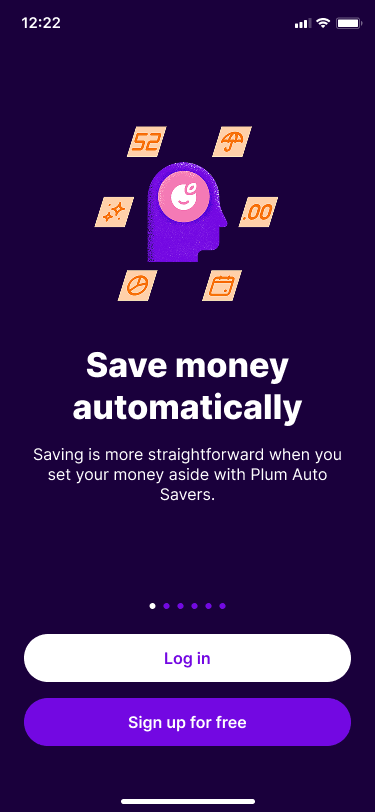
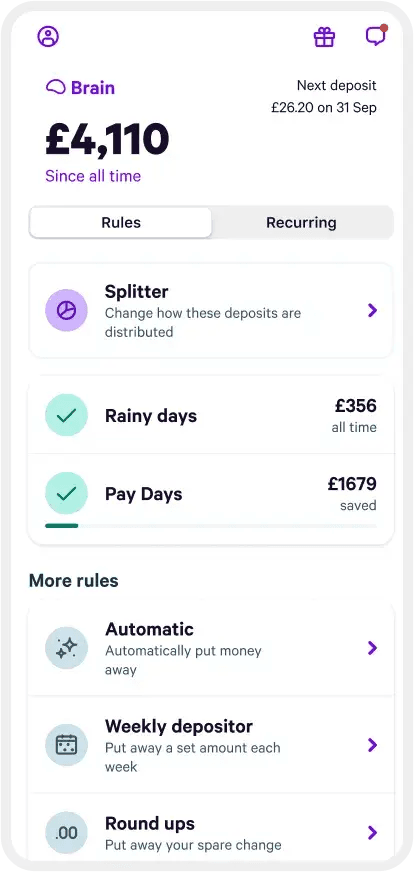
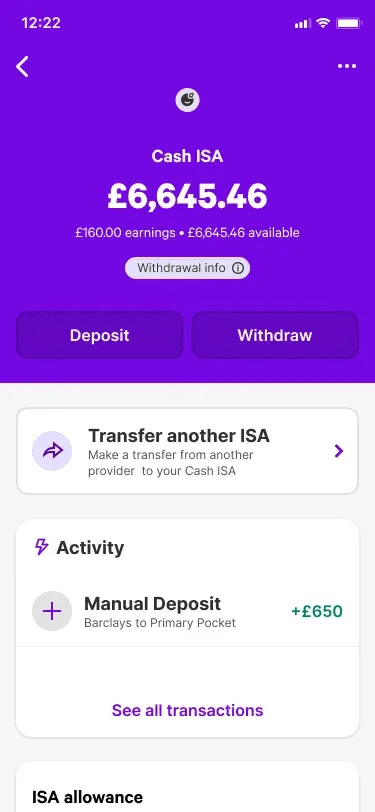
Plum is a smart money management app designed to automatically set aside money without you even thinking about it. It was founded in 2016, and started as a Facebook Messenger chatbot. Plum then launched the app (available on Android and iOS) which is designed to make managing your money easy, but it’s also effective for those who struggle to put that bit extra away. And the basic version is free. It also has savings accounts that you can compare.
12:50
How does Plum work?
Bank account access: Plum users give it access to their bank accounts in a read-only view using the latest biometric security measures.
Plum adapts to you: Plum’s smart software analyses and understands patterns in your income and spending habits to recognise the most effective way for savings to be made.
Auto-deposits: Once Plum calculates a suitable amount to be put aside each week, this amount is automatically transferred through direct debit into your Plum account to be held until you withdraw it.
Notifications: The Plum app can send you notifications about the amounts you’ve put aside, daily or weekly balance updates, and bills you could switch to save money.
Flexibility and accessibility: You can withdraw or deposit more money, keep a record of your deposited amount and even invest your savings directly through the app.
Spending insights: Plum keeps you informed with customisable updates to monitor your account activity.
Investing with Plum
Plum also gives you the option to invest some, or all, of your deposited money. You can choose between a range of investment funds, kept in a stocks and shares ISA, a general investment account or a money market investment fund. You should consider carefully which of these portfolios (you can choose multiple) is best for you, depending on your expertise and risk appetite. You can start investing with just £1.
What can you invest in with Plum?
Through the Plum app, you can choose how much to invest in a range of investment funds, or automatically allocate a set percentage of your auto-deposits to go towards those funds. Examples of the investments funds available include “Tech Giants” (which includes shares of tech leaders such as Apple, Facebook and Google), or “Slow & Steady” (a mix of bonds and stocks).
Here are the portfolios available:
Portfolio name
Types of investment
Risk
Tech Giants
Invest in technology shares
6/7
Clean and Green
Invest in companies selected for their social responsibility
5/7
Rising Stars
Invest in the growth of new giants in Asia and Africa
6/7
The Medic
Invest in shares of healthcare, pharmaceuticals and biotechnology companies
6/7
Balanced Ethical
A mix of assets based on their environmental, social and governance (ESG) criteria
5/7
Growth ethical
Invest in global companies selected for their environmental, social and governance (ESG) track record
5/7
American Dream
Invest in US company shares that tracks the performance of the S&P total market index
5/7
Best of British
Invest in the 100 largest public companies in the UK
5/7
European Essentials
Invest in large and mid-sized companies in developed markets in Europe.
5/7
Slow and Steady
20% shares and 80% bonds. This fund expects to get moderate returns and is better protected from losses.
3/7
Balanced Bundle
60% shares and 40% bonds. This fund has a balanced combination of shares and bonds.
4/7
Growth Stack
80% shares and 20% bonds. This fund has high potential returns but is higher risk.
5/7
How do I withdraw my Plum investments?
In terms of withdrawals, you can withdraw your investments as often as you wish, although it can take up to 5 days for the money to return to your account.
If you do decide to invest, keep in mind that your capital is at risk and that you could get back less than you invested.
What investment accounts are available with Plum?
You can choose between 4 accounts:
Plum ISA
Plum general investment account
Plum self invested personal pension
Plum Interest (money market investment fund)
Plum also offers a cash ISA and a lifetime ISA.
Plum general investment account
This account is a standard investment account. There aren’t any tax benefits, so people usually choose this one if they’ve used their ISA allowance already.
You can invest in the same portfolios as with the other accounts. You may be liable to pay tax on profits over £3,000 in each tax year.
Plum self invested personal pension
Plum also offers a SIPP, which lets you save up for your retirement. It’s designed to be automated and flexible. You can pay into your SIPP the same way as with its other products, and you can move existing pensions into your Plum SIPP.
The main benefit is that you can see all of your accounts in one place and invest in its wide range of funds. SIPP investors can choose from 3 funds designed for those investing for retirement.
Pensions can’t be cashed out until you turn 55, but you do get tax relief from the government, which Plum applies for on your behalf.
Plum ISA
With Plum’s ISA you can use your annual ISA allowance, which means that you can invest up to this amount each tax year without paying any tax on your profits. The allowance for the 2026/2027 tax year is £20,000.
Plum Interest
Launched in 2023, this is a low-risk money market investment fund that pays interest on your money and lets you withdraw cash by the next working day. Your money is invested in high-quality assets that generate interest.
Plum’s fees and limits
It’s free to start setting aside money with Plum. The free Plum Basic plan includes the app download and registration, as well as unlimited deposits and withdrawals, and the automatic deposit feature and bill analysis.
But there are fees for investing your money with Plum:
Plum Interest fee. If you open this account, you’ll be charged a 0.10% annual fund management fee charged by BlackRock and a Plum service fee of between 0% and 0.93% annually, depending on your subscription plan.
Stocks and Shares ISA fee. To access a stocks and shares ISA, you’ll need to have a paid plan, with costs starting from £3.99 a month. Fund manager and management fees apply – see below.
Fund manager and management fee. The fund manager fee is between 0.13% and 0.88% a year, depending on which fund you choose. Additionally, there is a monthly management fee of between 0.15% and 0.60% depending on your plan.
Stock investing fees. Foreign exchange fees of 0.15% to 0.60% and trade fees of up to 50p may apply, depending on your subscription plan.
SIPP fees. This is 0.45% a year. It’s broken down into 0.35% for the product provider administration fee and 0.10% for the custody service charge. There will also be a fund management fee.
Plum rebooted its choice of plans in summer 2026. As well as Plum Basic (free), there are 3 paid-for plans. Plum Plus costs £3.99 a month, Plum Boost £7.99 a month and Plum Max £14.99 a month. As well as the investment features you get with these paid-for plans, you can unlock additional functionalities, such as spending insights and more customisable savings pockets. Plum Max offers access to even more benefits, such as travel insurance and cinema tickets, as we explain below.
What is Plum Max?
This is the top Plum account tier, which costs £14.99 per month.
With Plum Max, you’ll get all the functionality available with the other plans, as well as the following features:
Worldwide family travel insurance
Discounts on lastminute.com bookings
Free NordVPN monthly subscription
2 for 1 cinema tickets
Finance news and insights with Finimize app
Restaurant deals
25% off coffee and barista-made drinks at selected coffee shops
40% off days out
60% off health check ups at Lucis
Plum debit card – this is a preloaded Visa card to help you budget
Repeat buy orders
Unlimited commission-free trades
Stock alerts – get alerted when a stock reaches a certain price
Access to a 95-day notice savings pocket
Plum’s Savings Accounts
Whichever plan you go for with Plum, you can open an Easy Access Savings Account or an Easy Access Savings Pocket to store some of your cash. However, Basic customers will receive a lower interest rate on that cash compared to paid-for plan customers, with Max customers receiving the top rate. Basic customers can open one Easy Access Savings Pocket, while everyone else can have 16.
Money in Plum savings accounts is held with Lloyds Bank, while money set aside in Plum’s Pockets will be held on trust with the Investec banking group, which means these funds will be protected by the Financial Services Compensation Scheme.
We currently don't have that product, but here are others to consider:
Looking for other options? Check out these similar products.
How we picked these
What is Plum’s “Naughty Rule” savings feature?
The “Naughty Rule” is a feature which automatically sets money aside every time you buy something from a retailer you consider a “guilty pleasure”. It’s only available with the paid plans.
When you purchase something “naughty” from one of the specified retailers, Plum will automatically put aside a set amount into your savings. You can set the amount of money to be set aside, ranging from £1 (“Mildy Mischievous”) to £10 (“Very Villanous”).
Once the “Naughty Rule” has been fully enabled, Plum will make one extra saving per day when you spend at one of your chosen retailers.
Is Plum safe?
Apart from money deposited in Pockets and savings accounts, funds held in a general Plum account are not specifically covered by the Financial Services Compensation Scheme (which protects deposits of up to £120,000), as the company is not a licensed bank. But Plum is authorised and regulated by the FCA as an e-wallet money agent of Modulr, which allows it to provide users with an e-wallet. Customer funds are held in a pooled account at a UK bank chosen by Modulr and are protected by safeguarding rules.
Plum also considers its users’ safety and security a top priority – and here are some of the ways Plum works to keep you safe:
Plum never stores, or accesses, your bank login details.
Plum receives read-only access to your transaction data, so has very limited information.
Plum only receives money through a direct debit, which you can cancel at any time.
Plum uses symmetric cryptography (AES) to store any sensitive data.
Plum uses state-of-the-art password algorithms.
Plum uses 256-bit TLS encryption to communicate between the browser and its servers.
Plum is a registered data controller and always acts in compliance with the Data Protection Act.
Plum runs its servers on Amazon’s cloud, which is trusted by some of the biggest financial institutions in the world.
What does the Plum app look like?
How does Plum make money?
Plum was heavily funded through its startup phase by crowdfunding campaigns. However, now it’s established it looks to create its own revenue through two main revenue streams:
Charging fees for its investment options (including its monthly subscription fees).
Finding its customers better deals on their bills and getting an introductory fee for facilitating any switches.
Pros and cons of Plum
Pros
Set aside your money easily and automatically.
Free to register and use.
Contact Plum easily through its Android and iOS app.
Withdraw money 24/7 and receive it within 24 hours (and often, within 15 minutes).
Money in your Plum account is held by Modulr, an EU-licensed e-money provider, which means the funds you have with Plum are safeguarded.
Plum’s algorithm prevents auto-deposits taking you into your overdraft (unless you manually deposit money when you’re in your overdraft).
Chance to grow your money by investing.
Option to open an interest-paying Easy Access Savings Accounts and Pockets.
Cons
If you choose to invest with Plum, you need to remember that as always when investing, your capital is at risk.
Customer funds are not protected by the Financial Services Compensation Scheme (apart from the money in Pockets and savings accounts, which is held on trust at the Investec banking group and Lloyds Bank).
Access to money isn’t instantaneous, it can take 24 hours.
Plum does not provide phone support.
What do customers say about Plum?
97% of customers we surveyed in 2026 would recommend Plum to a friend.
It is highly praised for its innovative, fun, and easy-to-use app that makes saving effortless. Customers love the automatic saving features that quietly set aside spare change without them having to think about it.
Alongside its excellent free tools for separating and managing money, users highlight the competitive interest rates, reliable customer service, and straightforward access to their funds.
AI-generated summary from the text of customer reviews on Finder.
Plum and Finder Awards
Our Finder Awards celebrate brands that truly stand out in their field. Plum was named our 2024 Savings People's Choice Award winner!
Customer service information for Plum
Email support
Telephone support
In-app or live chat
Contact form
Branch support
Bottom line
Saving is not an especially fun task, and while we all want to be doing it, doing the actual maths and remembering to transfer the money every week or every month requires a lot of commitment. So why not have it done automatically by Plum?
It’s a very smart concept, although there are a few drawbacks to consider. The main one is that Plum’s general account does not pay any interest. So your money won’t be growing unless you open an Easy Access Pocket, savings account, a cash ISA, or you decide to invest your funds, which of course entails a whole different set of risks and issues. Get started by downloading the app.
Overall, Plum can be a smart and fun way to put money aside without doing much budgeting, or even having to go into your current account to manually make a transfer. Plum also offers easy access savings accounts, and has a good range of investing options, some of which are suitable for beginners.
All investing should be regarded as longer term. The value of your investments can go up and down, and you may get back less than you invest. Past performance is no guarantee of future results. If you’re not sure which investments are right for you, please seek out a financial adviser. Capital at risk.
Frequently asked questions
Your money is held in accounts by Plum’s partner Modulr. Your Plum account is virtual and has no account number or sort code, the only way to access it is through Plum.
Yes! You will need to arrange this by setting a buffer under ‘Overdraft Deposits’ directly in the Plum app.
You can sign up for a Plum account directly through the app.
We show offers we can track - that's not every product on the market...yet. Unless we've said otherwise, products are in no particular order. The terms "best", "top", "cheap" (and variations of these) aren't ratings, though we always explain what's great about a product when we highlight it. This is subject to our terms of use. When you make major financial decisions, consider getting independent financial advice. Always consider your own circumstances when you compare products so you get what's right for you. Most of the data in Finder's comparison tables is provided by Defaqto. In other cases, Finder has sourced data directly from providers.
Matthew Boyle is a banking and mortgages publisher at Finder. He has a 7-year history of publishing helpful guides to assist consumers in making better decisions. In his spare time, you will find him walking in the Norfolk countryside admiring the local wildlife.
See full bio
Matthew's expertise
Matthew
has written
212
Finder guides across topics including:
Helping first-time buyers apply for a mortgage
Comparing bank accounts and highlighting useful features
Planning a trip abroad? Make sure you have a travel money card and app set up and ready to use abroad. Check out our guide to find the best one for you!
Want to send money to a phone without visiting a bank branch? Learn more about mobile payments, mobile banking and how to transfer money through a mobile phone.
The Chip savings app will connect to your current account and stash money away automatically. We cover all you need to know about the innovative app in this review.
Is Atom bank the right challenger bank for you? We explore the app and the features of Atom’s Fixed Saver accounts.
Advertiser disclosure
Finder.com is an independent comparison platform and information service that aims to provide you with the tools you need to make better decisions. While we are independent, the offers that appear on this site are from companies from which Finder receives compensation. We may receive compensation from our partners for placement of their products or services. We may also receive compensation if you click on certain links posted on our site. While compensation arrangements may affect the order, position or placement of product information, it doesn't influence our assessment of those products. Please don't interpret the order in which products appear on our Site as any endorsement or recommendation from us. Finder compares a wide range of products, providers and services but we don't provide information on all available products, providers or services. Please appreciate that there may be other options available to you than the products, providers or services covered by our service.
We update our data regularly, but information can change between updates. Confirm details with the provider you're interested in before making a decision.