Standout features:
- SoFi Plus membership with extra perks
- Overdraft coverage and overdraft protection
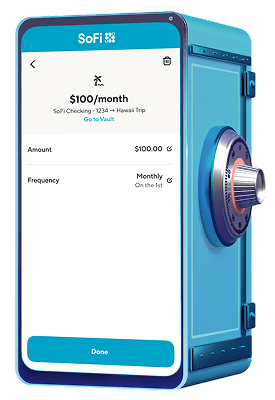
- Saving Vaults to sort goals


I’ve compared so many bank accounts over the years, and every once in a while, an account comes up with a really cool feature. It can be risky to create something unique that no one else has, so when I see one, it stands out.
While there are thousands of bank accounts to choose from, most aren’t unique. There are regulations to follow and features customers expect, and people don’t like to mess around with their money. But since there’s so much competition, lots of banks and credit unions will claim their accounts are groundbreaking to draw in new customers.
Banks will often advertise standard features as unique perks, like mobile check deposits, instant ACH transfers between accounts, a free mobile bank app or say you can use Zelle with no fees. Let’s be real; these aren’t so much cool features as they are standard functionalities nowadays.
Luckily for you, I know what’s standard and what’s actually unique, and I’ve seen some interesting accounts with standout features.
Just to name a few, you can create savings Vaults to organize your savings goals, earn up to 3.30% APY on savings, turn on overdraft protection and coverage, opt in to savings round-ups for auto savings, use Zelle for peer-to-peer payments and more. Aside from its deposit account, there’s also SoFi Invest®, lending options and credit cards.
The hybrid account doesn’t have any monthly fees or opening deposit requirements. However, to get the highest savings rates, you’ll need to either set up direct deposit, or deposit at least $5,000 per month, or pay a $10 monthly subscription fee to get SoFi Plus.
A standout feature is the Cleo AI chatbot that can roast or praise your spending habits, identify spending trends and help you build budgets. Enable various save Hacks, such as roundups that round up purchases for seamless savings, and the Swear Jar that fines you for spending at your guilty pleasure stores and adds the fine to your savings. Cleo also offers a credit-building card, cash advances, spending and savings challenges, a savings account that earns up to 2.75% APY and much more.
There are four plans to choose from: Free, Plus, Pro and Builder. The Builder plan — its credit-building plan — for $14.99 per month, with discounts for yearly payment plans.

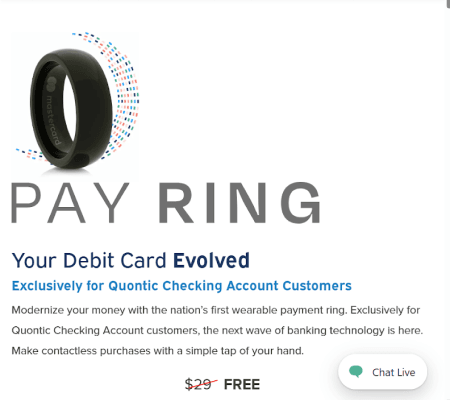
The Pay Ring is a wearable, contactless debit card that Quontic checking customers can get with no extra cost. The ring doesn’t need to be charged because it uses the same tech as contactless, plastic debit cards. It’s made from zirconia ceramic, is water-resistant and can be managed through the Quontic app. You can use it anywhere the contactless symbol is, like for purchases or at ATMs, and any rewards tied to your Quontic account add up just like debit card transactions. If you’re not sure of your ring size, Quontic offers a free ring sizing kit you can use before you order the ring.
However, like other digital banks, you won’t have access to physical branches for support.
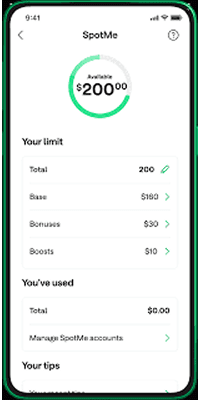
The Chime app and accounts have tons of features, including Pay Anyone, which kind of works like Zelle, but it lets you send cash to anyone with a debit card for no fees (and they don’t need a Chime account). Chime also has other cool perks, like its SpotMe overdraft protection service and a credit-building secured card with no interest charges. With the checking account, you unlock the savings account that earns up to 1% APY, with no monthly fees or deposit requirements.
The Chime® Checking Account itself has no monthly fees, opening deposit requirements or overdraft fees. However, some features, like Chime SpotMe®, do have minimum direct deposit requirements.
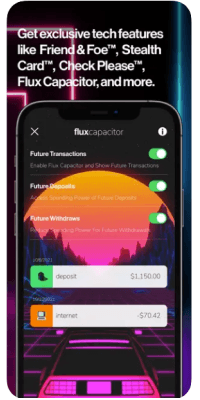
The Unicorn Card is a credit card with no annual fee. Its security features are the standout perks, like Flux Capacitor, Stealth Card and Friend & Foe. For example, the Stealth Card is a temporary virtual card that you can generate for “sketch” transactions, like shopping online at a new site, or use for free trials. Aside from those neat perks, you won’t be charged that APR when you enable autopay through an external account or the Cred.ai deposit account. The Cred.ai Guaranty states you’ll never be charged interest or fees because autopay will resolve your owed balance before it accrues interest. And you get a metal card!
On the downside, Cred.ai is a newer fintech, it’s online only and it doesn’t have a rewards program.
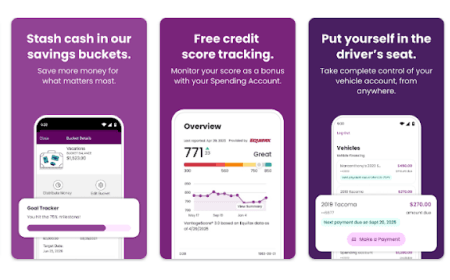
One of those features is called Surprise Savings, where Ally analyzes your spending and automatically moves money that it thinks is “safe-to-transfer” into your savings. It isn’t super aggressive either, since it can only transfer amounts up to three times per week, and amounts must be under $100. Ally’s savings and checking accounts also come with up to 30 savings buckets that you can create to sort your savings goals. Each goal can have a unique target, and then you can activate Surprise Savings, recurring transfers or opt in to savings round-ups.
The Ally checking and savings accounts don’t charge any monthly fees or have balance requirements. Savings earns up to 3.1% APY, which is a pretty good rate in today’s market.
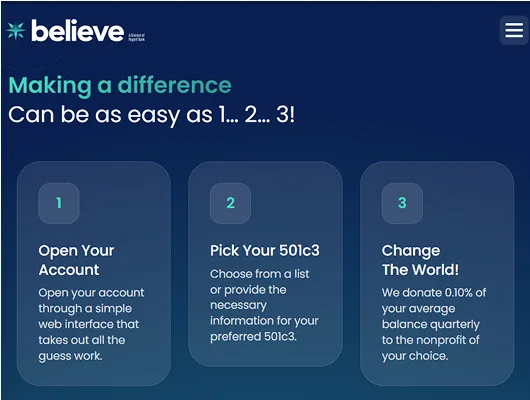
Not only does it offer up to 3.55% APY on your balance, but Believe also donates 0.10% APY to a non-profit of your choice (501c3), and that donation doesn’t come out of your pocket. Believe donates 0.10% of your average balance quarterly on your behalf. You can choose from non-profits on its list or provide information about the non-profit you want to support.
With no monthly fees and a $100 opening deposit, it’s a pretty good savings account on its own. However, it’s online only and doesn’t come with an ATM card, so you’ll have to rely on digital deposits and withdrawals.
Compare two banks side by side with our comprehensive guides:
Narrow down top checking accounts by monthly fees, features and APYs. For a closer comparison, tick the Compare box on multiple options to see benefits side by side.
The Finder Score crunches over 300 checking accounts from hundreds of financial institutions. It takes into account the product's monthly fees, overdraft fees, opening deposit, customer support options, ATM network and features — this gives you a simple score out of 10.
To provide a Score, Finder’s banking experts analyze hundreds of checking accounts against what we consider is the best option: no monthly fees, no overdraft fees, a large ATM network of 50,000 or more, additional features outside of typical banking services, and the optional perk of earning interest. Accounts that are nearly free to maintain and use are scored the highest, while accounts with costly fees and few features are scored the lowest.
With so many bank accounts to choose from, it’s easy to get paralyzed. Compare the best checking accounts and savings accounts in the market, chosen by our strict editorial methodologies and thorough research.

PNC is a very large bank in the US. See how it stacks up when it comes to account options, customer ratings and services.
Ally Bank sometimes offers new customer bonuses, but right now, they just have an active referral program.
BMO is a large bank with a variety of bonuses available, up to $1,500.
Offering up to $500 in checking bonuses, KeyBank’s bonuses are enticing. However, the bank doesn’t operate in all states.
Compare Citizens Bank two personal bank account bonuses; but one of them requires getting two accounts at the same time.
Discover whether GO2bank integrates with Zelle and if you may need to explore alternative payment options.
Chime is a fintech company and not a true bank, so it can’t integrate with Zelle. But you can use Chime’s Pay Anyone for P2P payments.
Looking for a no credit check bank account? Chime, Wise and Chase offer top bank accounts that don’t use ChexSystems.
Ally is a legit online bank with no monthly fee and a high APY. See what it’s doing to protect your data and compare to other banks here.
You can open a joint bank account with three or more people. Learn how it works, how to sign up and what risks to be aware of.
