
Capital One 360 Checking
An interest-bearing checking account with flexible overdraft options and international access.
- $0 monthly fees
- Large ATM network (70,000)
- Multiple overdraft protection options
- 0% foreign transaction fees
- Works with Zelle

Deposit slips are pretty universal among financial institutions, and they’re there to help the bank establish a written record of deposits and withdrawals done throughout the day. If you have a combination of cash and checks or multiple checks to deposit simultaneously at a branch, a deposit slip can be a way to get it done in one fell swoop.
Capital One 360 Checking
An interest-bearing checking account with flexible overdraft options and international access.
It’s a straightforward process with five basic steps:
And that’s it! Most banks offer deposit slips with clear lines to fill out. Just be sure to add up your subtotal and net deposit correctly, and you’ll likely need your ID to finish the process. Double-check all your information before handing it over to the teller as well.
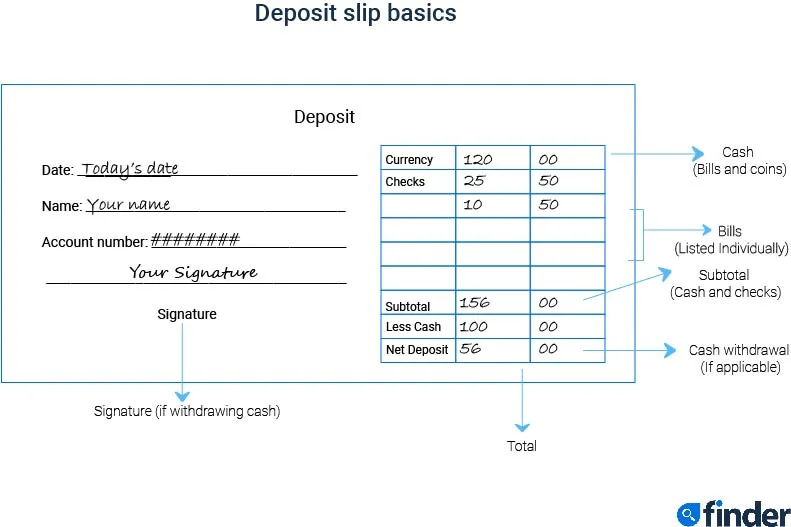
No, you don’t need a deposit slip to deposit a check or cash, and they’re not necessary when you visit a bank to deposit items. In fact, deposit slips are considered somewhat outdated, thanks to online banking. Other methods of depositing cash and checks include:
Keep in mind that mobile check deposits and ATM deposits may take a few days to clear, depending on the amount and your bank.
Mobile check deposit is a somewhat newer feature offered by banks, so many likely feel uneasy using a feature like this for the first time — which is entirely fair considering everyone wants their money to be safe.
However, a mobile check deposit is considered a safe and secure transaction. When doing a mobile check deposit, your information is encrypted, which means your information is converted into data or a code to prevent unauthorized individuals from accessing your personal information. Also, you must be logged in to your mobile banking app to use a mobile check deposit feature, and you’ll receive confirmation and a receipt that the check was processed.
Narrow down top checking accounts by rates and minimum opening deposit to find the best for your budget and financial goals. Select Compare for up to four products to see their benefits side by side. And if you want a broader look at your options, compare checking accounts with multiple providers.
We currently don't have that product, but here are others to consider:
How we picked theseThe Finder Score crunches over 300 checking accounts from hundreds of financial institutions. It takes into account the product's monthly fees, overdraft fees, opening deposit, customer support options, ATM network and features — this gives you a simple score out of 10.
To provide a Score, Finder’s banking experts analyze hundreds of checking accounts against what we consider is the best option: no monthly fees, no overdraft fees, a large ATM network of 50,000 or more, additional features outside of typical banking services, and the optional perk of earning interest. Accounts that are nearly free to maintain and use are scored the highest, while accounts with costly fees and few features are scored the lowest.
Business deposit slips are essentially the same as personal deposit slips, but business deposit slips typically have more lines to allow for a greater number of checks and also tend to have routing and account numbers preprinted on them.
Also, businesses may be able to deposit checks using a check scanner, depending on the bank. Cash, of course, still needs to be deposited in person or through a deposit box.
It’s not necessary to bundle cash for a deposit. The bank puts the money through a counter, so you can bundle the cash for your own convenience, but bundling is not a necessary step to deposit large amounts of cash at the same time. If you want to stay organized, you can also put the cash in an envelope, and the bank teller will take it from there.
Image source: Getty Images

Compare Wells Fargo’s new customer bank account bonus offers for its various personal and business accounts.
Compare account options from Capital One and Credit One Bank side by side.
If you set up a Varo Checking account through Finder, you could earn a $300 digital Visa card—just for becoming a new customer and following a few simple steps. Offer is valid for a limited time only.
Finder $300 Varo Promotion – Terms and Conditions
Bank of America has a few bonuses for its checking accounts, but both have some requirements you need to meet.
Banks like SoFi, PNC, HSBC, US Bank, Axos, KeyBank, Fifth Third Bank and more offer instant fund availability with mobile check deposit.
Close alternatives to Varo include Chime, SoFi, Revolut, Current and more. See how these top alternative banks compare.
Top online banks like Chime include SoFi, Revolut, Varo, Current, Capital One, Step, Mine (formerly Fizz) and more. See how these Chime alternatives compare.
Tracking the Fed funds rate from 1954 to now.
A mobile-only account to make banking more convenient.
