Key takeaways
- Open your new account first. Move your balance, payments and deposits over a few weeks, then close the old account only once everything has cleared.
- Run both accounts for a cycle or two. Keeping the old one open for one to two billing cycles helps you catch any payments or charges you missed.
- Your EIN and business credit stay the same. The main risks are missed payments and bounced checks, which a good checklist and some overlap time can prevent.
Business bank accounts can be pivotal for managing your business’s funds, taxes and keeping everything organized. But when it comes time to switch business accounts, it can be a bit of a pain.
How to switch business accounts in 7 steps
If you need a more detailed list of steps in switching accounts, here are seven clear steps:
- Open your new business account. Apply online or in a branch with your EIN, formation documents and ID. Fund it with a small transfer to activate it.
- Order checks and debit cards. Request new debit cards and checks right away, since they can take a week or more to arrive.
- Update automatic payments and direct debits. Go through your last three statements to find every recurring charge, then give each company your new bank account details.
- Update incoming payments. Send your new account and routing numbers to clients and update your payout details with payment processors and marketplaces (like Square, PayPal and Shopify).
- Move payroll. Update the funding account with your payroll provider before the next pay run, since most providers need a few days to verify a new account.
- Transfer your balance. Move most of your money once incoming payments are landing in the new account. Leave enough in the old one to cover any checks or payments that haven’t cleared.
- Close the old account. Once nothing has hit the old account for a full billing cycle, download your statements, move the remaining balance and ask the bank to close it.
Switching business account checklist
Here is a quick checklist to have handy when switching accounts:
- Payroll provider
- Tax payments (IRS EFTPS, state)
- Merchant processors (Stripe, Square, PayPal)
- Accounting software (QuickBooks, Xero)
- Vendors and subscriptions
- Loan payments
- Invoices and your website
Hot tip: Handling federal taxes when switching accounts
Should you keep both accounts open during the switch?
Yes. Ideally, it is worth your time to keep both accounts open for at least one to two billing cycles.
Keeping both accounts open can help you catch annual charges, clients that pay on a less-regular basis or irregularly, and catch any outstanding checks you might have missed.
If your old business account has a minimum balance requirement, or it takes a while for everything to switch over, just keep enough in the old account to avoid overdrafts or minimum balance fees.
Does switching banks affect business credit?
Not usually. Switching business accounts, opening a new business account or closing an old one typically doesn’t impact your business credit score.
Business credit bureaus like Dun & Bradstreet, Experian and Equifax track loans, credit cards and payments to suppliers — not business checking or savings accounts.
However, there may be a few exceptions to this:
- Credit checks when you apply. Some banks check the owner’s personal credit or ChexSystems report when you open an account. If it’s a hard credit check, it can cause a small, short-term dip in your personal score. If it’s a soft check, there’s no impact.
- Closing a credit card or credit line. If you also close a business credit card or credit line with your old bank, your business credit can change, since those accounts often show up on credit reports.
- Leaving a negative balance. An unpaid overdraft can get sent to collections or reported to ChexSystems, which can make it harder to open accounts later.
- Relationship with your bank. Although this isn’t directly tied to your business credit score, having a long history with a bank can help when you apply for a loan there. Switching bank accounts means that you’re starting that history over.
Compare top business bank accounts to switch to
Click the Checking or Savings tab to see those types of accounts. Narrow down top business accounts by fees, APYs and perks. For a better look, tick the Compare box on multiple accounts for a side by side comparison.
Looking for other options? Check out these similar products.
How we picked theseWhat is the Finder Score?
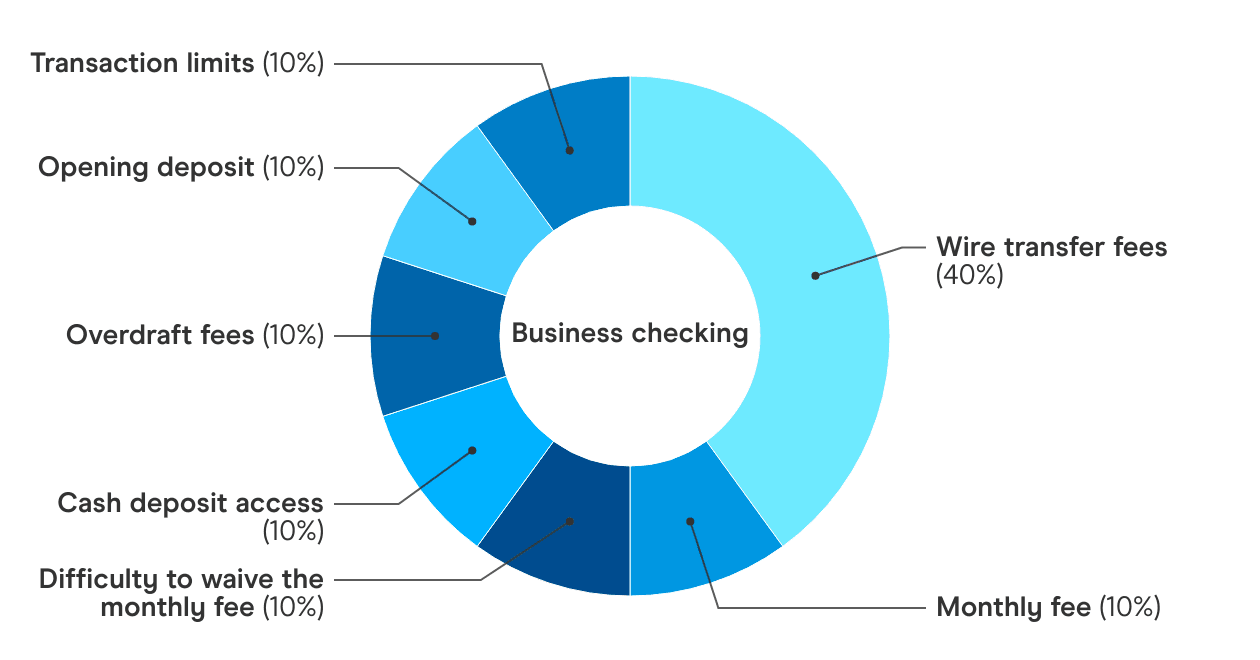
The Finder Score analyzes and evenly weighs business accounts against multiple factors, including monthly maintenance fees, opening deposits, overdraft fees, wire transfer fees and transaction limitations. We also award accounts that offer extra perks not normally offered, such as annual percentage yield (APY), without penalizing accounts that aren’t interest-bearing.
Looking for other options? Check out these similar products.
How we picked theseWhat is the Finder Score?
The Finder Score analyzes and evenly weighs business accounts against multiple factors, including monthly maintenance fees, opening deposits, overdraft fees, wire transfer fees and transaction limitations. We also award accounts that offer extra perks not normally offered, such as annual percentage yield (APY), without penalizing accounts that aren’t interest-bearing.
Bottom line
Switching business bank accounts can take a few weeks, but it’s mostly a matter of order.
Open your new account first, then move over payments, deposits, payroll and tax payments. Keep both accounts open for a billing cycle or two, and only close the old one once everything has cleared and you’ve downloaded your statements. Your EIN and business credit stay the same, so the main risks are missed payments and bounced checks, which a good checklist and some overlap time can help prevent.
Looking to switch to a new business bank account? Compare the best business checking accounts.
Frequently asked questions
-
Yes. Your LLC and your bank account are separate. You can open a new account under the same LLC at any time.
-
No. Your EIN belongs to your business, not your bank. Use the same EIN for your new account.
-
If you close the account before they clear, they'll bounce. Keep the old account open with enough money to cover them, or ask the recipients to cash them first.
-
Usually, yes. Update the autopay account with your lender. Some loans require you to keep an account with the lending bank or offer a rate discount for autopay from that bank, so check your loan agreement first.
-
Some do. Chase, for example, has an Account Switching Guide with a step-by-step checklist. Ask your new bank if it offers one.
-
Log in to your old bank's online banking and download statements as PDFs before you close the account. If you've already closed it, contact the bank directly. Fees may apply.
-
Finder writers are subject matter experts and use primary sources, in-depth research and interviews with other experts to ensure you're getting accurate, up-to-date information. Articles are fact checked in line with our editorial guidelines.
Bethany Hickey is the banking editor and personal finance expert at Finder, specializing in banking, lending, insurance, and crypto. Bethany’s expertise in personal finance has garnered recognition from esteemed media outlets, such as Nasdaq, MSN, Yahoo Finance, GOBankingRates, SuperMoney, AOL and Newsweek. Her articles offer practical financial strategies to Americans, empowering them to make decisions that meet their financial goals. Her past work includes articles on generational spending and saving habits, lending, budgeting and managing debt. Before joining Finder, she was a content manager where she wrote hundreds of articles and news pieces on auto financing and credit repair for CarsDirect, Auto Credit Express and The Car Connection, among others. Bethany holds a BA in English from the University of Michigan-Flint, and was poetry editor for the university’s Qua Literary and Fine Arts Magazine. See full bio
- Personal finance
- Banking
- Auto loans
- Insurance
- Cryptocurrency and NFTs
More guides on Finder
-
Business Bank Account Requirements: What Do You Need to Apply?
Business accounts tend to require more documentation than personal accounts, but it’s pretty straightforward.
-
Compare QuickBooks Alternatives
Xero, Wave, FreshBooks and Zoho Books are some of the closest Quickbooks competitors. Compare your options here.
-
Methodology: Business Checking Accounts
Here’s how we rate business checking accounts, covering what we look for in fees, cash deposit, opening requirements, transaction limits, APY and account features.
-
Baselane Review: Business Account for Property Owners
A property management software and account designed for landlords.
-
Best Business Bank Accounts for Small Businesses (2026)
Find the best business bank accounts for LLCs with low fees, software integrations and extra perks like ATM reimbursements.
-
Square Savings Account Review
The Square Savings account is a solid choice for business owners who want to automate their savings.
-
First Internet Bank Do More Business Checking Account Review
See how the Do More Business Checking business account with no monthly fee compares to others in the market.
-
Bluevine Business Checking Review
Small business owners can earn up to 3% APY with Bluevine’s business checking account that accepts cash deposits.
-
8 Best Free Business Checking Accounts
Compare the best free business checking accounts available with no monthly fees, such as Bluevine, NBKC, Found, Novo and Axos.
-
5 Best Business Savings Accounts
The best business savings accounts are available from Axos, Live Oak, Bluevine, First Internet Bank and NBKC.