Live Oak Business Essential Checking Review

- Fee
- $10 per month
- Minimum deposit to open
- $100
Our verdict
Great reviews for its customer support, but its checking lacks some razzle-dazzle.
Live Oak is an online bank, Member FDIC. Live Oak offers business checking and business savings, and its checking products have three account options with varying fees and perks. With any of the three, you’ll need a $100 opening deposit, and monthly fees are either $10 per month (waivable)*, $25 per month (waivable)* or $100 per month, depending on your plan. And while Live Oak’s business checking covers the basics, it lacks some perks you get from other top options like Novo or Bluevine.
Best for: Small business owners who use QuickBooks.
Pros
-
$10 waivable monthly fee
-
Connects to QuickBooks
-
Large network of 55,000+ Allpoint® ATMs
-
Member FDIC
Cons
-
No rewards program
-
Fewer integrations than some options
-
No cash deposits
Live Oak Business checking accounts and costs
You have three business checking account options to choose from with Live Oak, as well as optional add-ons you can tack on for a little more cheddar. For any of the account options, you’ll need to meet a $100 opening deposit.
Account | Monthly fee | Features |
|---|---|---|
Business Essential | $10/month, can be waived* with $1,000 average daily balance |
|
Business Plus | $25/month, can be waived* with $25,000 average daily balance |
|
Business Plus Analysis | $100/month, earning credits could offset fees* | Everything with Plus, and:
|
Optional features (for additional fees) | Varies |
|
What we like about Live Oak
Live Oak is FDIC insured on its own, offering typical deposit insurance on your funds. But if you have more than $350,000 in your account, Live Oak offers a way to get additional deposit coverage without having to disperse your own cash across different banks.
High deposit insurance with sweep
With its cash sweep account, you can get up to $10 million in coverage* if you have a minimum balance of $350,000. If you meet that balance requirement to enroll, the expanded coverage is free and you don’t have to do anything on your end.
US-based customer support
With many online banks, one of the most common complaints is customer support, often citing language barriers, no phone line at all or just slow response times via digital forms and email.
Live Oak advertises personalized phone support from its US-based team, and the feedback is overwhelmingly positive when it comes to customer service.
On Live Oak’s Trustpilot profile, it has a 4.6-star rating. Nearly all these reviews cite great staff, with adjectives like fast, reliable, helpful, professional and efficient — all words you want to see with a business that deals with your cash.
What could be better
The biggest downside with Live Oak is, to be frank, the account’s plainness compared to other business checking accounts we’ve seen. We also found a lot of extra fees (listed below), including fees for incoming domestic wires, which isn’t typical.
However, the Live Oak savings account has a high APY and few fees, and often makes our best business savings account list.
Lacks some razzle-dazzle
Live Oak doesn’t offer a debit card rewards program or interest on your checking balance.
Additionally, Live Oak does not appear to offer team or corporate card programs or even the ability to create virtual cards. Its site states you can “set employee permissions,” but we don’t see any mentions of employee cards specifically. If you need employee or virtual cards, consider options like Revolut or Wise.
Limited software integrations
Live Oak also supports one software integration: QuickBooks. That’s great, since QuickBooks is easily one of the most popular options, but that means it doesn’t connect to payroll or HR platforms.
Many other online business accounts, like Novo, support multiple software integrations, like Stripe, Amazon, PayPal and Gusto.
Live Oak business checking fees and access
Type of fee | Fee details |
|---|---|
Monthly service | $10/mo, $25/mo or $100/mo (some waivable* with balance requirements) |
Opening deposit | $100 |
ATMs |
|
Debit card fees |
|
Overdraft fee | $25 |
Wire transfers |
|
Other fees |
|
Compare Live Oak business checking to other top business accounts
Narrow down top business accounts by APYs, fees and features. Select Compare on up to four accounts for a side-by-side comparison.
What is the Finder Score?
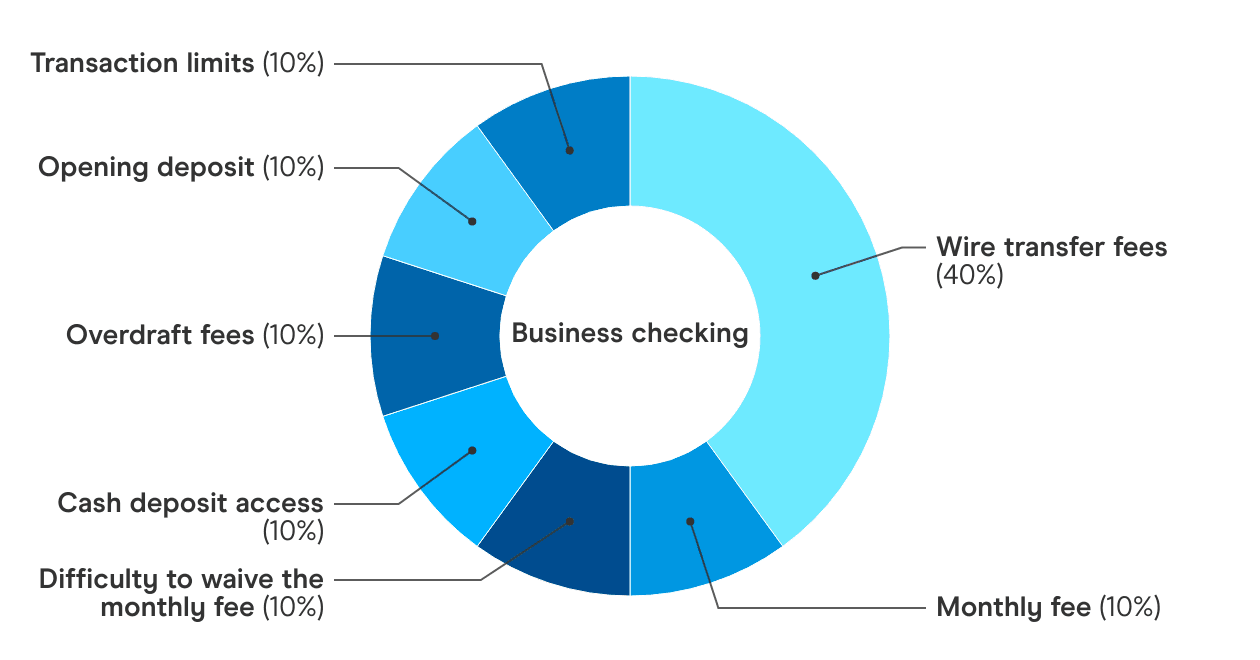
The Finder Score analyzes and evenly weighs business accounts against multiple factors, including monthly maintenance fees, opening deposits, overdraft fees, wire transfer fees and transaction limitations. We also award accounts that offer extra perks not normally offered, such as annual percentage yield (APY), without penalizing accounts that aren’t interest-bearing.
Live Oak customer reviews and ratings
BBB accredited | Yes |
|---|---|
BBB rating | A+ |
BBB customer reviews | N/A |
Trustpilot Score | 4.6 out of 5, based on 1,788 customer ratings |
Customer reviews verified as of | 03/26/26 |
Live Oak has great customer reviews, and I’ll be the first to say that is not the norm for an online bank. Most digital banks have thousands of complaints about their customer service policies, or just reports of poor customer support in general.
The bank is also accredited by the Better Business Bureau (BBB) and has zero reviews at the time of writing, which is a good sign. Most people only go to the BBB to complain — so again, props to Live Oak.
Aside from high remarks on its customer support, Live Oak also gets praise on its high savings rates with no balance requirements to open an account. Its business checking accounts might be a little lacking compared to the competition, but Live Oak’s business savings is a solid, low-maintenance account that gets high marks from us, and customers typically agree.
Frequently asked questions
Your reviews

Bethany Finder
Banking editor
You are about to post a question on finder.com:
- Do not enter personal information (eg. surname, phone number, bank details) as your question will be made public
- finder.com is a financial comparison and information service, not a bank or product provider
- We cannot provide you with personal advice or recommendations
- Your answer might already be waiting – check previous questions below to see if yours has already been asked
Finder only provides general advice and factual information, so consider your own circumstances, or seek advice before you decide to act on our content. By submitting a question, you're accepting our finder.com Terms of Use and Privacy and Cookies Policy.
This site is protected by reCAPTCHA and the Privacy Policy and Terms of Service apply.